本帖最后由 M397749490 于 2026-6-28 16:00 编辑
|Minecraft Java 版是指 Windows、Mac OS 与 Linux 平台上,使用 Java 语言开发的 Minecraft 版本。
|每周快照是 Minecraft Java 版的测试机制,主要用于下一个正式版的特性预览。
|然而,每周快照主要用于新特性展示,通常存在大量漏洞。因此对于普通玩家建议仅做测试尝鲜用。在快照中打开存档前请务必进行备份。适用于正式版的 Mod 不兼容快照,且大多数 Mod 都不对每周快照提供支持。
|Minecraft Java 版 26.2 仍未发布,7 为其第 7 个快照。
|本文内容按照 CC BY-NC-SA 4.0 协议进行授权,转载本帖时须注明原作者以及本帖地址。
 NEWS
NEWS
Minecraft 26.2 Snapshot 7 Minecraft 26.2 Snapshot 7
A Minecraft Java Snapshot 一个 Minecraft Java 快照
In today's snapshot we're introducing the new Friends List for Java Edition, making it easier than ever to stay connected and jump into play together. Curious how it works? You can read more about Friends List here .
在今天的快照中,我们为 Java 版引入了全新的好友列表,让你比以往更轻松地保持联系并一起游玩。想知道它如何运作吗?你可以在这里阅读更多关于好友列表的信息。
But that's not all! We might be feature complete – but we have a final surprise for you! Listen to the official soundtrack for Chaos Cubed by fingerspit (Paula Ruiz) today – including the music disc Bounce!
但这还不是全部!我们可能已经完成了特性开发——但我们还有一个最后的惊喜给你!今天就来听听由 fingerspit (Paula Ruiz) 为 Chaos Cubed 创作的官方原声带吧——其中包含音乐唱片 Bounce!
Happy Mining!
挖矿愉快!
NEW FEATURES
新特性
- Added a new Music Disc with the track "Bounce" by fingerspit
- 加入了新的音乐唱片,曲目为 fingerspit 创作的“Bounce”
- Added 5 new music tracks by fingerspit
- 加入了 5 首由 fingerspit 创作的新音乐
- Added the Friends List
- 加入了好友列表
- Added the ability to easily play with your friends through peer-to-peer, even when you're not on the same local network
- 加入了即使不在同一本地网络,也能通过点对点方式轻松与好友游玩的能力
MUSIC
音乐
- Added a new music disc:
- 加入了新的音乐唱片:
- "Bounce" by fingerspit
- fingerspit 创作的“Bounce”
- Has a chance of being found in Mineshaft Chest Minecarts that are located in a Sulfur Cave biome
- 有几率在位于硫黄洞穴生物群系的废弃矿井运输矿车中找到
- Has a comparator output of 8 when played in a Jukebox
- 在唱片机中播放时,比较器输出信号强度为 8
- Added 5 new background music tracks by fingerspit:
- 加入了 5 首由 fingerspit 创作的新背景音乐:
- "Shores"
- “Shores”
- "Memories"
- “Memories”
- "Nightly"
- “Nightly”
- "Home"
- “Home”
- "Ebb"
- “Ebb”
FRIENDS LIST
好友列表
- Added a Friends List, accessible from a new Friends button on the Title Screen and the Pause Menu
- 加入了可以从主界面和暂停菜单中的新“好友”按钮访问的好友列表
- The Friends list can be opened with a new key bind (default: "O")
- 好友列表可以通过新的按键绑定打开(默认:“O”)
- The Friends button shows a notification badge with the number of incoming friend requests, up to 5 (a "more" indicator is shown beyond that)
- 好友按钮会显示一个通知徽章,显示收到的好友请求数量,最多显示 5 个(超过则显示“更多”指示器)
- The Friends List is presented as an overlay with two tabs:
- 好友列表以叠加层形式呈现,有两个选项卡:
- Friends: shows your current friends, lets you remove them, and lets you send a new friend request by Profile Name
- 好友:显示你当前的好友,允许你移除好友,并可以通过玩家档案名发送新的好友请求
- Pending: shows incoming friend requests (which can be accepted or declined) and outgoing friend requests (which can be canceled)
- 待处理:显示收到的好友请求(可接受或拒绝)以及发出的好友请求(可取消)
- The presence of your friends is shown under their name in the Friends List as one of the following:
- 好友的在线状态会显示在好友列表中其名称下方,为以下之一:
- "Offline"
- “离线”
- "Online"
- “在线”
- "In a world"
- “在世界中”
- "In a joinable world"
- “在可加入的世界中”
- Sending, accepting, declining, cancelling, and removing actions are confirmed in the UI and show a clear error message when the service is unreachable, rate limited, or the requested Profile Name does not exist
- 发送、接受、拒绝、取消和移除操作会在用户界面中确认,并在服务不可达、受到速率限制或请求的玩家档案名不存在时显示明确的错误信息
- Friend changes that happen while the game is running are shown through toast notifications:
- 游戏运行时发生的好友变动会通过弹出通知显示:
- When a friend request is sent
- 当发送好友请求时
- When a friend request is received
- 当收到好友请求时
- When an outgoing friend request is accepted by the other player
- 当发出的好友请求被对方玩家接受时
- Toasts show the other player's face when the skin is available
- 弹出通知会在皮肤可用时显示对方玩家的面部
- The Friends List checks for updates once per minute while the Friends List is open, or every 5 minutes otherwise
- 好友列表打开时,每分钟检查一次更新,否则每 5 分钟检查一次
- The first time the Friends button is shown on the Title Screen, a confirmation dialog is presented to opt in to the Friends List
- 主界面首次显示好友按钮时,会弹出一个确认对话框以选择使用好友列表
- The Friends List, friend request privacy, and the Microsoft account safety settings link are managed from the new "Friends List" section in Online Options
- 好友列表、好友请求隐私以及 Microsoft 账户安全设置链接都可以在“在线选项”中新增的“好友列表”部分进行管理
- Players that have their chat settings set to "Friends Only" on their XBox profile will only see chat messages from other players if they are friends
- 在 XBox 个人资料中将聊天设置设为“仅限好友”的玩家,将只能看到来自好友的聊天消息
KNOWN ISSUES
已知问题
Developer's Note: This is the first version of this system, released with a few known issues. It will be improved over the coming snapshots.
开发者注:这是该系统的首个版本,发布时存在一些已知问题。将在后续快照中逐步改进。
- Cancelling a friend request before the receiver has accepted it can leave the receivers incoming list in a desynced state
- 在接受者尚未接受时取消好友请求,可能导致接受者的收件列表处于不同步的状态
- The receiver will still see it as incoming, but when they accept it, it'll turn into an outgoing friend request for them
- 接受者仍会看到该请求为待处理,但接受后,该请求会变成他们发出的好友请求
- Rejecting a friend request can leave the sender's outgoing list in a desynced state
- 拒绝好友请求可能导致发送者的发件列表处于不同步的状态
- The sender also needs to cancel their friend request to get back to a properly synced state
- 发送者也需要取消他们的好友请求,才能回到正确同步的状态
- If a player has the friend list turned on, but the "Allow Requests" setting turned off, other players can't accept outgoing friend requests from them
- 如果玩家开启了好友列表,但关闭了“允许请求”设置,其他玩家将无法接受来自他们的好友请求
- If your Xbox profile chat setting is set to "Friends Only", you cannot see your own chat messages
- 如果你的 Xbox 个人资料聊天设置设为“仅限好友”,你将无法看到自己的聊天消息
PEER-TO-PEER
点对点
- Added the ability to open singleplayer worlds to online multiplayer from the new Multiplayer Options screen
- 加入了从新的“多人游戏选项”界面将单人游戏世界开放为在线多人联机的能力
- There are two paths to play with your friends
- 有两种途径与好友一起游玩
- Invite to world: the host can invite friends to their world, and the invited players can accept or deny the invitation
- 邀请加入世界:房主可以邀请好友加入他们的世界,受邀玩家可以接受或拒绝邀请
- Request to join world: players can request to join a friend's world (if it's open to online multiplayer), and the friend can accept or deny the request
- 请求加入世界:玩家可以请求加入好友的世界(如果该世界已开放在线多人联机),好友可以接受或拒绝该请求
- Added new p2p_connection opt-in telemetry event
- 添加了新的可选择加入的遥测事件 p2p_connection
CHANGES
改动
- The Slow Bouncy Sulfur Cube archetype is no longer buoyant
- 缓慢弹性硫方怪原型不再具有浮力
- The grass color is now less green in Sulfur Caves
- 硫磺洞穴中的草颜色现在不那么绿了
- Updated the Main Menu background panorama
- 更新了主菜单背景全景图
POTENT SULFUR
烈性硫黄
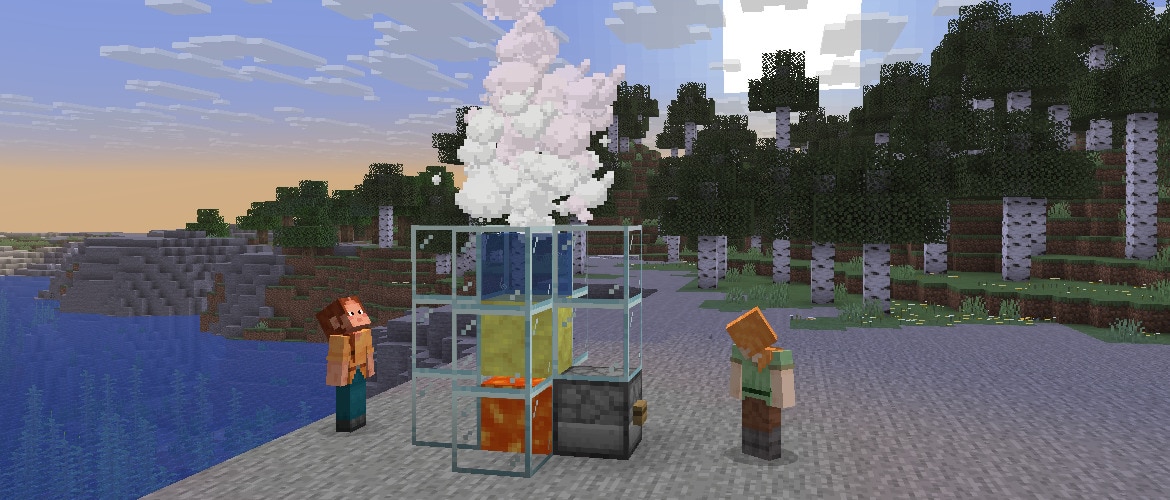
- Eruption and cooldown times of Geysers are now randomized based on the position of the block and do not change if the block is replaced
- 间歇泉的喷发和冷却时间现在基于方块位置随机化,且替换方块后不会改变
- Potent sulfur can now erupt when a Lava block is placed underneath
- 烈性硫磺现在在下方放置熔岩时会喷发
- With Lava underneath, the Geyser eruption is continuous, but with slightly muted sounds compared to the eruption from a Magma block
- 下方有熔岩时,间歇泉将持续喷发,但声音比来自岩浆块的喷发略显柔和
- Noxious Gas from Potent Sulfur can now rise through non-collidable waterlogged blocks and spread through other non-collidable blocks
- 来自烈性硫黄的毒气现在可以向上穿过不可碰撞的含水方块,并在其他不可碰撞方块中扩散
- Erupting Potent Sulfur can now emit its plume and boost entities through non-collidable blocks
- 正在喷发的烈性硫黄现在可以穿过不可碰撞方块喷出气流并推动实体
- This includes Scaffolding, which can be used as an alternative to Copper Grates to stand above erupting Potent Sulfur without being affected by Noxious Gas
- 这包括脚手架,可以作为铜格栅的替代品,让你站在喷发的烈性硫黄上方而不受毒气影响
UI
用户界面
- Added a Friends button to the Title Screen and the Pause Menu
- 在主界面和暂停菜单中添加了好友按钮
- Replaced the Open to LAN screen with the new Multiplayer Options screen
- 将“对局域网开放”界面替换为新的“多人游戏选项”界面
MULTIPLAYER OPTIONS
多人游戏选项
- This screen allows you to configure the multiplayer settings of the world you're currently in
- 此界面允许你配置当前所在世界的多人游戏设置
- The multiplayer scope can be set to one of the following:
- 多人游戏范围可以设置为以下之一:
- Off: (default) Nobody can join your world
- 关闭:(默认)无人可以加入你的世界
- Local: only players in your local network can join your world, as the Open to LAN screen used to work
- 本地:只有本地网络中的玩家可以加入你的世界,就像以前的“对局域网开放”功能一样
- Online: you can invite your friends to join your world from anywhere
- 在线:你可以邀请你的好友从任何地方加入你的世界
- The game mode and allow cheats options are also available in this screen
- 游戏模式和允许作弊选项也可在此界面中使用
SETTINGS
设置
- Added a setting to control the availability of the Friends List and its features in Online Options
- 在“在线选项”中添加了一个控制好友列表及其功能可用性的设置
- Added an "In-game Notification" toggle in Online Options to control whether Friends List toasts appear while in a world
- 在“在线选项”中添加了In-game Notification开关,控制好友列表的弹出通知是否在世界中显示
- Added an "Allow Requests" toggle in Online Options to control whether other players can send you friend requests
- 在“在线选项”中添加了Allow Requests开关,控制其他玩家是否可以向你发送好友请求
- Added an "Xbox Settings..." button in Online Options that opens the Microsoft account privacy and online safety settings
- 在“在线选项”中添加了Xbox Settings...按钮,用于打开 Microsoft 账户隐私和在线安全设置
- Added a Presence option in Online Options screen to control how much activity is shared with friends (default: "All")
- 在“在线选项”界面中添加了“状态”选项,控制与好友共享的活动程度(默认:“全部”)
- "All": shares activity, and allows friends to request to join your world if opened up to online multiplayer
- “全部”:共享活动信息,并允许好友在开启在线多人联机时请求加入你的世界
- "Limited": activity sharing limited to "Online" & "Offline"
- “有限”:活动共享仅限于“在线”和“离线”
- "None": no activity shared. Appearing as "Offline" to friends
- “无”:不共享活动信息。对好友显示为“离线”
TECHNICAL CHANGES
技术性改动
- The Data Pack version is now 105.1
- 数据包版本现在是 105.1
- The Resource Pack version is now 87.0
- 资源包版本现在是 87.0
DATA PACK VERSION 105.1
数据包版本 105.1
BLOCK TAGS
方块标签
- Added #causes_periodic_geyser_eruptions - all blocks that cause periodic eruptions of Potent Sulfur blocks
- 添加了 #causes_periodic_geyser_eruptions - 所有导致烈性硫黄方块周期性喷发的方块
- Added #causes_continuous_geyser_eruptions - all blocks that cause continuous eruptions of Potent Sulfur blocks
- 添加了 #causes_continuous_geyser_eruptions - 所有导致烈性硫黄方块持续喷发的方块
RESOURCE PACK VERSION 87.0
资源包版本 87.0
- Signs and Hanging Signs now use block models instead of built-in entity models
- 告示牌和悬挂式告示牌现在使用方块模型,而不是内置的实体模型
- The text on Signs and Hanging Signs cannot be configured yet
- 告示牌和悬挂式告示牌上的文本尚无法配置
- The minecraft:signs atlas has been removed
- 移除了 minecraft:signs 图集
BLOCK SPRITES
方块精灵图
- Signs and Hanging Signs now use block models and textures, replacing <wood_type> with the sign's wood type (e.g. mangrove)
- 告示牌和悬挂式告示牌现在使用方块模型和纹理,将 <wood_type> 替换为告示牌的木材类型(例如 mangrove)
- block/<wood_type>_sign.png
- block/<wood_type>_sign.png
- block/<wood_type>_hanging_sign.png
- block/<wood_type>_hanging_sign.png
- The process of upgrading your pack's Bed, Sign, and Hanging Sign textures can be assisted by using this automated Slicer tool
- 升级你的资源包的床、告示牌和悬挂式告示牌纹理的过程,可以借助这个自动化的 Slicer 工具来完成
ITEM SPRITES
物品精灵图
Added new Item sprites:
添加了新的物品精灵图:
- item/music_disc_bounce.png
- item/music_disc_bounce.png
UI SPRITES
UI 精灵图
- Added new textures for the Sign edit screen background, replacing <wood_type> with the sign's wood type (e.g. mangrove):
- 为告示牌编辑界面背景添加了新纹理,将 <wood_type> 替换为告示牌的木材类型(例如 mangrove):
- gui/sign/<wood_type>.png
- gui/sign/<wood_type>.png
- Added new UI sprites:
- 添加了新的 UI 精灵图:
- gui/sprites/friends/multiplayer/invite.png
- gui/sprites/friends/multiplayer/invite.png
- gui/sprites/friends/multiplayer/join_request.png
- gui/sprites/friends/multiplayer/join_request.png
- gui/sprites/friends/accept.png
- gui/sprites/friends/accept.png
- gui/sprites/friends/accept_highlighted.png
- gui/sprites/friends/accept_highlighted.png
- gui/sprites/friends/cancel.png
- gui/sprites/friends/cancel.png
- gui/sprites/friends/friends.png
- gui/sprites/friends/friends.png
- gui/sprites/friends/illustrations_00.png
- gui/sprites/friends/illustrations_00.png
- gui/sprites/friends/list_separator_top.png
- gui/sprites/friends/list_separator_top.png
- gui/sprites/friends/loading.png
- gui/sprites/friends/loading.png
- gui/sprites/friends/reject.png
- gui/sprites/friends/reject.png
- gui/sprites/friends/reject_highlighted.png
- gui/sprites/friends/reject_highlighted.png
- gui/sprites/friends/remove.png
- gui/sprites/friends/remove.png
- gui/sprites/friends/background.png
- gui/sprites/friends/background.png
- gui/sprites/friends/button.png
- gui/sprites/friends/button.png
- gui/sprites/friends/button_disabled.png
- gui/sprites/friends/button_disabled.png
- gui/sprites/friends/button_highlighted.png
- gui/sprites/friends/button_highlighted.png
- gui/sprites/friends/toast_background.png
- gui/sprites/friends/toast_background.png
- gui/sprites/pause_menu/player_reporting.png
- gui/sprites/pause_menu/player_reporting.png
- gui/sprites/pause_menu/bug.png
- gui/sprites/pause_menu/bug.png
- gui/sprites/pause_menu/social_interactions.png
- gui/sprites/pause_menu/social_interactions.png
SOUNDS
音效
- Added sounds for Geyser eruptions:
- 为间歇泉喷发添加了音效:
- block.potent_sulfur.geyser_continuous_eruption
- block.potent_sulfur.geyser_continuous_eruption
- block.potent_sulfur.geyser_continuous_eruption_active
- block.potent_sulfur.geyser_continuous_eruption_active
- Added biome music for Sulfur Caves:
- 为硫黄洞穴添加了生物群系音乐:
- music.overworld.sulfur_caves
- music.overworld.sulfur_caves
ITEM MODELS
物品模型
- The following special model types have been removed:
- 移除了以下特殊模型类型:
- minecraft:standing_sign
- minecraft:standing_sign
- minecraft:hanging_sign
- minecraft:hanging_sign
TELEMETRY
遥测
NEW OPT-IN EVENTS
新的可选择加入事件
- p2p_connection
- p2p_connection
- This event is sent after a peer-to-peer connection attempt
- 该事件在尝试点对点连接后发送
- Added new property: p2p_connection_successful
- 添加了新属性:p2p_connection_successful
- Whether the peer-to-peer connection was established successfully
- 点对点连接是否成功建立
- Added new property: p2p_connection_failure_stage
- 添加了新属性:p2p_connection_failure_stage
- The stage where an unsuccessful connection attempt failed, such as SIGNALING, ICE_CONNECT, or TIMEOUT
- 连接尝试失败时所处的阶段,例如 SIGNALING、ICE_CONNECT 或 TIMEOUT
- Added new property: p2p_connection_ice_path
- 添加了新属性:p2p_connection_ice_path
- The type of network path used for the connection, such as LOCAL, DIRECT, RELAY, or UNKNOWN
- 连接所使用的网络路径类型,例如 LOCAL、DIRECT、RELAY 或 UNKNOWN
- Added new properties: p2p_connection_local_candidate_type and p2p_connection_remote_candidate_type
- 添加了新属性:p2p_connection_local_candidate_type 和 p2p_connection_remote_candidate_type
- The ICE candidate types used by each side of the connection, such as HOST, SRFLX, PRFLX, or RELAY
- 连接双方使用的 ICE 候选类型,例如 HOST、SRFLX、PRFLX 或 RELAY
- Added new properties: p2p_connection_total_time_ms, p2p_connection_signaling_time_ms, and p2p_connection_ice_connect_time_ms
- 添加了新属性:p2p_connection_total_time_ms、p2p_connection_signaling_time_ms 和 p2p_connection_ice_connect_time_ms
- Timing information for each stage of the peer-to-peer connection flow
- 点对点连接流程每个阶段的时间信息
FIXED BUGS IN 26.2 SNAPSHOT 7
26.2 SNAPSHOT 7 修复的漏洞
- MC-297491 - Glyphs from TTF files are no longer rendered correctly on glow signs
- MC-297491 - 来自 TTF 文件的字形在发光告示牌上不再正确渲染
- MC-306401 - Shulkers' name tags display inside them when they're open
- MC-306401 - 潜影贝打开时名字标签会显示在其内部
- MC-306972 - Wardens repeatedly roar in place when detecting ghasts
- MC-306972 - 监守者在检测到恶魂时会在原地反复咆哮
- MC-307144 - The game reads world generation data from data packs or world_gen_settings.dat inconsistently, preventing updating large biome sources
- MC-307144 - 游戏读取数据包或 world_gen_settings.dat 中的世界生成数据不一致,导致无法更新大型生物群系源
- MC-307221 - The missing texture is no longer used for blocks with no model or an invalid model
- MC-307221 - 没有模型或模型无效的方块不再使用丢失纹理
- MC-307272 - Servers can no longer detect left clicks from players in Spectator mode
- MC-307272 - 服务器不再能检测到旁观模式玩家的左键点击
- MC-307336 - Colors are less saturated with the Vulkan rendering backend on some Mac systems
- MC-307336 - 在某些 Mac 系统上使用 Vulkan 渲染后端时,色彩饱和度降低
- MC-307339 - The player's vertical motion is reset when moving on the ground
- MC-307339 - 玩家在地面移动时垂直运动被重置
- MC-307387 - When using Vulkan, the Globals uniform is not available in multiple core shaders unless explicitly defined
- MC-307387 - 使用 Vulkan 时,Globals uniform 在多个核心着色器中不可用,除非显式定义
- MC-307418 - The game crashes when trying to upgrade a legacy world
- MC-307418 - 尝试升级旧版世界时游戏崩溃
- MC-307421 - Vulkan does not trigger an error when a resource pack that cannot be loaded is loaded
- MC-307421 - 当加载无法加载的资源包时,Vulkan 不会触发错误
- MC-307442 - The game crashes upon startup on Mac systems with Intel graphics of Gen8 architecture
- MC-307442 - 在搭载 Gen8 架构 Intel 显卡的 Mac 系统上,游戏启动时崩溃
- MC-307455 - The game crashes when minimized on some Intel graphics
- MC-307455 - 在某些 Intel 显卡上最小化游戏时崩溃
- MC-307498 - The standing_sign special model renderer uses a field misspelled as "attachement"
- MC-307498 - standing_sign 特殊模型渲染器使用了一个拼写错误的字段“attachement”
- MC-307499 - The game crashes upon detecting invalid shader files during loading
- MC-307499 - 加载期间检测到无效着色器文件时游戏崩溃
- MC-307585 - The fall_after_explosion advancement trigger does not work with TNT anymore
- MC-307585 - fall_after_explosion 进度触发器不再对 TNT 生效
- MC-307605 - The "Exclusive Fullscreen" and "Graphics API" options prompt the user to restart the game differently
- MC-307605 - “独占全屏”和“图形 API”选项提示用户重启游戏的方式不一致
- MC-307817 - Target selectors no longer allow specifying type multiple times when using tags
- MC-307817 - 目标选择器在使用标签时不再允许多次指定 type
- MC-307877 - Bone meal cannot be used on dry grass with a block directly above it
- MC-307877 - 无法在正上方有方块的枯草上使用骨粉
- MC-307905 - Crash report generation can crash when StackTraceElement.getFileName() is null
- MC-307905 - 当 StackTraceElement.getFileName() 为 null 时,生成崩溃报告可能导致崩溃
- MC-307912 - Sulfur spikes in sulfur springs are not waterlogged
- MC-307912 - 硫黄涌泉中的硫黄尖刺不含水
- MC-307919 - Geysers' force goes through some transparent blocks
- MC-307919 - 间歇泉的推力会穿过某些透明方块
- MC-307920 - Bucketed sulfur cubes can despawn
- MC-307920 - 桶装硫方怪会消失
- MC-307929 - Dispensers can equip armor on sulfur cubes
- MC-307929 - 发射器可以为硫方怪装备盔甲
- MC-307952 - The enchantment glint does not render on top of banner patterns applied on a shield
- MC-307952 - 附魔光效不会渲染在盾牌上的旗帜图案上方
【无情兰剑 译自Java Team 2026 年 5 月 12 日发布的 Minecraft 26.2 Snapshot 7】
【本文排版借助了:SPXXKLP 用户脚本 v3.2.5】
Powered by SPXXKLP 3.2.5 with love
Converted at 2026-05-13 00:32 +0800
|想了解更多游戏资讯? |

 mxy***
铁粒 +50
苦力怕论坛感谢有你~
mxy***
铁粒 +50
苦力怕论坛感谢有你~
 提升卡
提升卡 观察者
观察者