本帖最后由 牢冥王 于 2026-9-19 01:05 编辑
|Minecraft 基岩版是指运行在移动平台(Android、iOS)、Windows 10/11、主机(Xbox One、Switch、PlayStation 4/5)上,使用「基岩引擎」(C++语言)开发的 Minecraft 版本。
|正式版是 Minecraft 基岩版经过一段时间的测试版测试之后得到的稳定版本,也是众多纹理、附加包和 Realms 会逐渐跟进的版本。与此同时 Google Play、Microsoft Store 等官方软件商店也会推送此次更新。
|本文内容按照 CC BY-NC-SA 4.0 协议进行授权,转载本帖时须注明原作者以及本帖地址。
 NEWS
NEWS
Minecraft: Bedrock Edition 26.50 Changelog
《我的世界:基岩版》26.50更新日志
Wilderness Bound is out now in Minecraft!
现在《我的世界》推出奔赴荒野了!
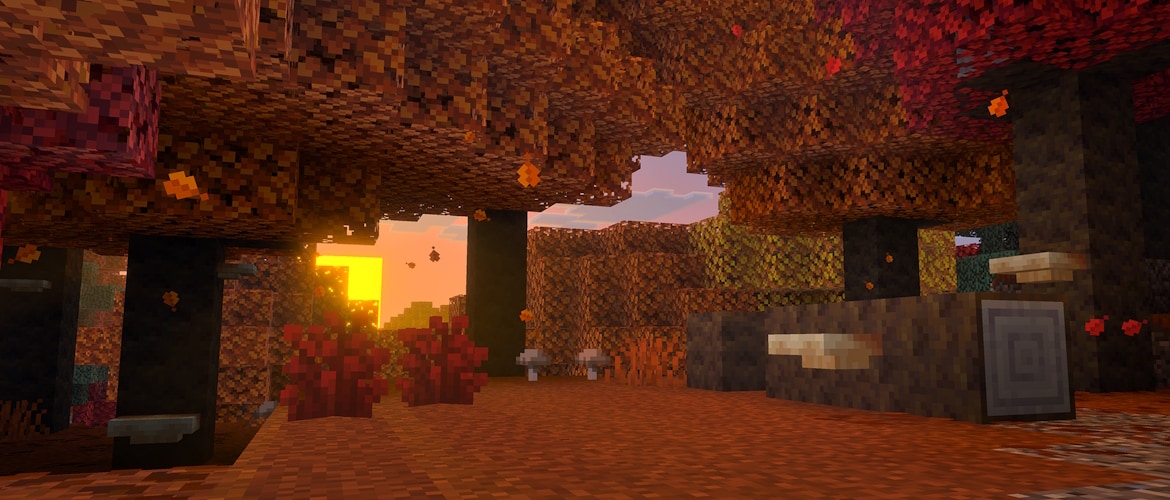
Wilderness Bound is out now in Minecraft! Pack your supplies and set off on an expedition into the dappled forest where the trails end and adventure begins. Seek out abandoned camps, build outposts among the poplar trees, sleep under the stars on straw beds, and share campfire stories atop cushions. Just remember that the wilderness rewards the prepared — and maps are lighter than regrets!
现在《我的世界》推出奔赴荒野了!备好补给,出发,去未为人知的斑驳森林探险吧。找到废弃营地、用杨树搭建前哨、枕着麦秆床在星夜下入眠、坐在坐垫上“围着营火讲故事”。只是别忘了荒野奖励的是有准备的人——一“图”在手,万事不愁!
GAME DROP 3 FEATURES
第三次小更新的内容
ABANDONED CAMP
废弃营地
- The Abandoned Camp structure is a new kind of structure which can be found in the following biomes:
- 废弃营地是出现在以下生物群系中的新结构:
- Meadow
- 草甸
- Cherry Grove
- 樱花树林
- Forest
- 森林
- Birch Forest
- 桦木森林
- Old Growth Birch Forest
- 原始桦木森林
- Flower Forest
- 繁花森林
- Windswept Forest
- 风袭森林
- Dappled Forest
- 斑驳森林
- Taiga
- 针叶林
- Snowy Taiga
- 积雪针叶林
- Old Growth Spruce Taiga
- 原始云杉针叶林
- Old Growth Pine Taiga
- 原始松木针叶林
- Sparse Jungle
- 稀疏丛林
- Bamboo Jungle
- 竹林
- Swamp
- 沼泽
- Savanna
- 热带草原
- Wooded Badlands
- 疏林恶地
- Pale Garden
- 苍白之园
- Each of these biomes has its own variant of the structure with design based on that biome
- 各生物群系都有依其风格设计的结构变种
- Certain structure pieces are generic for all biome variants of the structure
- 某些结构片段是所有生物群系变种所通用的
- Various Chests and Barrels with loot can be found at Abandoned Camps
- 废弃营地中会出现各种战利品箱子和木桶
- Straw Beds can be found in Abandoned Camps
- 废弃营地中会出现麦秆床
- Cushions can be found in Abandoned Camps
- 废弃营地中会出现坐垫
- Chests in Abandoned Camps contain Explorer Maps that lead to Ancient City, Mineshaft, Desert Pyramid, Warm Ocean Ruins, and other biome variants of Abandoned Camps
- 废弃营地的箱子中会包含指向远古城市、废弃矿井、沙漠神殿、热带海底废墟,以及其他废弃营地生物群系变种的探险家地图
BLOCKS
方块
- Added Wool Stairs and Wool Slab blocks in all 16 colors
- 加入了所有16种颜色的羊毛楼梯和羊毛台阶
- Added Concrete Stairs and Concrete Slab blocks in all 16 colors
- 加入了所有16种颜色的混凝土楼梯和混凝土台阶
CUSHION
坐垫
- The Cushion is an item that the player can place in the world and interact with to sit on
- 坐垫是玩家可置于世界并通过交互乘于其上的物品
- Can be crafted in 16 colored variants
- 可合成为16种颜色变种
- Cushions are crafted using 3 Wool Slabs of the same color
- 坐垫由3个同颜色的羊毛合成
CUSHION PLACEMENT RULES
坐垫放置规则
- A Cushion can be placed on any flat surface
- 可在任意水平面放置坐垫
- Cushions always align horizontally to the grid, but vertically sit on top of the supporting surface
- 坐垫将始终对齐水平网格,并且竖直高度位于支撑面之上
- Cushions cannot move
- 无法移动坐垫
- Cushions break if the supporting block is removed
- 若移除支撑方块,会破坏坐垫
- Cushions do not have collision and can overlap with other objects (except other Cushions)
- 坐垫没有碰撞箱,并可与(坐垫外的)其他对象重叠
DAPPLED FOREST
斑驳森林
- The Dappled Forest is a new type of forest biome which can be found near cold biomes
- 斑驳森林是出现在寒带生物群系附近的新的一种森林生物群系
- Poplar Trees and fallen Poplar Trees generate here
- 杨树和倒下的杨树生成于此
- Shelf Mushrooms can be found here, placed on Poplar Trees and fallen Poplar Trees
- 层孔菇出现于此处的杨树和倒下的杨树上
- Red Shrubs generate here
- 红灌木生成于此
- The following passive and neutral mobs spawn in the Dappled Forest, using their cold variants where applicable:
- 若条件允许,以下友好和中立生物以其寒带变种生成于斑驳森林:
- Sheep
- 绵羊
- Chicken
- 鸡
- Cow
- 牛
- Pig
- 猪
- Rabbit
- 兔子
- Fox
- 狐狸
- A Dappled Forest variant of the new Abandoned Camp structure can be found here
- 新的废弃营地斑驳森林变种将出现于此
POPLAR TREES
杨树
- Added the Poplar Tree to the game
- 游戏中加入了杨树
- A new type of tree in the Dappled Forest which comes in three color variations:
- 斑驳森林种有三种颜色变种的新树类型
- Red Poplar Leaves
- 红色杨树树叶
- Orange Poplar Leaves
- 橙色杨树树叶
- Yellow Poplar Leaves
- 黄色杨树树叶
- Each variant of the tree has its own variant of falling leaf particles matching the color of the leaves
- 各树变种各有匹配其树叶颜色的落叶粒子
- Poplar Leaves drop Poplar Saplings which will randomly grow into any of the three different variants
- 杨树树叶将掉落可随机成长为三个变种的任意一个的杨树树苗
- Poplar Saplings can be found in trades with Wandering Trader
- 可通过流浪商人交易杨树树苗
- Shelf Mushrooms and Leaf Litter naturally generates on and around Poplar Trees
- 层孔菇和枯叶堆自然生成于杨树上和四周
- The trunk of the trees are made of Poplar Logs
- 这些树的树干由杨木原木构成
- Poplar Logs can be crafted into a new set of Poplar wood blocks
- 可将杨木原木合成为新的杨木方块系列
- Forest ambience sounds are tied to the Poplar Leaf blocks
- 森林环境音效与杨树树叶方块绑定
RED SHRUB
红灌木
- Red Shrub is a new type of decorative plant block that can be found in small patches in the Dappled Forest
- 红灌木是出现在斑驳森林的小斑块中新的一种装饰性植物方块
- Can be used in the Composter
- 可用于堆肥
- Using Bone Meal on a Red Shrub grows a Red Shrub in a random adjacent space, if possible
- 对红灌木使用骨粉会在可用的临近空间随机增殖一个红灌木
SHELF MUSHROOM
层孔菇
- A new type of mushroom that generates on Poplar Trees and fallen Poplar Trees
- 生成于杨树和倒下的杨树上的新的蘑菇类型
- Can be found in two sizes, small and large
- 拥有两种尺寸:小型和大型(区别于棕色蘑菇和红色蘑菇,它们会长成大型地物,而层孔菇只会增加一个生长阶段)
- A small Shelf Mushroom can be grown into a large Shelf Mushroom using Bone Meal
- 可用骨粉将小型层孔菇催熟为大型层孔菇
- A large Shelf Mushroom drops two Shelf Mushroom items when broken
- 破坏大型层孔菇会掉落两个层孔菇物品
- Can be used like other mushrooms to make Stews
- 可像其他蘑菇一样合成为炖菜或煲
- Can be found in trades with Wandering Trader
- 可通过流浪商人交易
- Shelf Mushroom has a slight bounciness when stepped on, similar to Beds
- 踩在层孔菇上有类似床的轻微弹性
STRAW BED
麦秆床
- Straw Bed is a new type of bed which can be used to sleep through the night without setting your spawn point
- 麦秆床是可用于跳过夜晚并不设置重生点的新的一种床
- It can only be used once and will be destroyed after use
- 只能使用一次,使用后会损毁
- It can not be used in the Nether or The End and will be destroyed if you try to sleep on it there
- 无法在下界或末地使用,若试着在这些地方使用它会损毁
- It is crafted using 3 Hay Bales and will give you 4 Straw Beds
- 用3个干草捆合成4个麦秆床
- Straw Beds breaks faster when using a Hoe
- 用锄能加速破坏麦秆床
FEATURES AND BUG FIXES
特性和漏洞修复
ACCESSIBILITY FEATURES
可访问性
- The "Text to Speech with Device Settings" option has been removed. Text to speech can still be turned on or off through the accessibility settings, and a first time TTS discovery is still done on all devices as before.
- 移除了“设备设置文本转语音输出”。文本转语音功能仍可通过可访问性设置开关,所有设备上依然有文本转语音的初次提醒。
- A green vignette now appears while the nausea effect is active when screen distortion is turned all the way off via accessibility settings (MCPE-239554)
- 现在通过可访问性设置全面关闭屏幕扭曲时激活反胃效果将表现为绿色的特效(MCPE-239554)
BLOCKS
方块
- Restored the growth speed of Sulfur Spikes and Pointed Dripstone after a recent change accidentally made them grow 25 times faster
- 修复了最近的更改意外导致硫黄尖锥和滴水石锥的生长速度加快25倍的问题
- Cherry, Pale Oak, and Poplar Saplings are no longer flammable, matching all other Saplings
- 樱花、苍白橡树,和杨树树苗不再能被点燃,以匹配其他树苗
- Fixed Saplings not growing when Leaves were above them (MCPE-240014)
- 修复了树苗不能在树叶位于其上时生长的问题(MCPE-240014)
- Fixed block connection states being lost when loading a world saved before those states existed, which could leave fences, stairs, thin fences, and trip wire drawn as if they were not connected
- 修复了在加载从这些方块状态存在之前的世界(此前这些连接行为是硬编码的,并没有存储为方块状态)时,导致栅栏、楼梯、板状围栏(栏杆、玻璃板)和绊线看起来未连接并丢失方块连接状态的问题
CHARACTER CREATOR
角色创建器
- Skins can now have names consisting entirely of numbers
- 现在皮肤的名称可完全由数字组成
GAMEPLAY
玩法
- Fixed Hoppers unintentionally collecting items on its side at large coordinates (MCPE-99462)
- 修复了漏斗在大绝对值坐标处意外从侧面吸收物品的问题(MCPE-99462)
- Fixed Droppers facing east or south inserting items into containers below them instead of ejecting items forward (MCPE-167490)
- 修复了朝向东方和南方的投掷器向下方的容器填充物品而不是将物品按朝向抛出去的问题(MCPE-167490)
- Fixed a bug where damage calculation did not apply correctly to Players falling from certain heights through one block of water
- 修复了玩家从特定高度落下并穿过一格水时伤害计算不正确的漏洞
- Fixed an issue that could cause players who died while inside a Nether portal to respawn in the Nether
- 修复了玩家在下界传送门内死亡会在下界重生的问题
- Fixed an issue where the same world seed would generate end portals with inconsistent amounts of Eyes of Ender (MCPE-227980)
- 修复了同一个种子生成的末地传送门有不一致的末影之眼数量的问题(MCPE-227980)
- Fixed entity teleporting to unexpected location when using the teleport command between dimensions (MCPE-181173)
- 修复了在维度间使用teleport命令传送实体会将其传至意外位置的问题(MCPE-181173)
- Player Map icon now shows rotation even while outside of the map bounds
- 现在玩家在地图边界外时他的玩家地图图标也会显示朝向
- Explorer Maps now have new item icons to better indicate where they lead
- 现在探险家地图拥有新图标以更好表明它们的目的地
- Fixed Totem activation not synchronizing health when final health equals the original value
- 修复了当最终生命值等于原始值时激活不死图腾,生命值不同步的问题
- Fixed an issue where players and mobs could load in a world at (0,0,0) and lose all their items after reloading world
- 修复了玩家和生物在(0, 0, 0)处加载世界,会在重载时丢失全部物品的问题
- Lava lakes no longer replace nearby Beds or Doors with stone during world generation if a lake generates in a village
- 世界生成阶段当岩浆湖生成于村庄时不再替换床或门周围的石头
GRAPHICAL
图像
- Fixed missing Baby Fox texture (MCPE-240546)
- 修复了幼年狐狸的纹理丢失问题(MCPE-240546)
- Fixed clouds rendering as bright white spots after switching to Vibrant Visuals in-game with low cloud render distance
- 修复了在游戏中切换为灵动视效且云层渲染距离较低时,云层渲染为亮白色点的问题
- Fixed tears in the dithering effect when looking through models in Vibrant Visuals.
- 修复了灵动视效下,透过模型查看时,淡化效果的撕裂问题。
- In-game models and textures now load correctly when the network connection changes while joining a world (MCPE-234954)
- 现在加入世界时更改网络连接会正确加载游戏内模型和纹理(MCPE-234954)
- Fixed bug with item in hand jittering with temporal anti-aliasing upscaling enabled
- 修复了手持物品在启用时间抗锯齿升频时抖动的漏洞
- Fixed an issue that caused the sky to render incorrectly when seen through boats in Vibrant Visuals
- 修复了造成灵动视效下透过船观察天空不正确渲染的问题
- Changed the map color of the Red Shrub to Crimson Nylium
- 将红灌木的地图颜色改为与绯红菌岩一致
- Changed the map color of the Shelf Mushroom to Terracotta Yellow
- 将层孔菇的地图颜色改为与黄色陶瓦一致
ITEMS
物品
- Updated Sulfur Cube Spawn Egg icon's MERS (MCPE-237771)
- 更新了硫方怪刷怪蛋的MERS图标(MCPE-237771)
- Projectiles can now only hit the entity that shot them, or entities in the same vehicle hierarchy (such as the shooter's mount), after they have spatially left that hierarchy (MCPE-240527)
- 现在弹射物仅在空间上完全脱离发射它的实体或与实体在同一乘载结构中(比如发射者的坐骑)的结构时击中(MCPE-240527)
- This prevents players from damaging themselves with lightly charged Arrows
- 这将阻止玩家使用轻度蓄力的箭伤害自己
- Fixed issues that occurred when attempting to pick up a Small Sulfur Cube or a lit TNT Sulfur Cube with a Bucket (MCPE-239750)
- 修复了尝试使用铁桶带走小型硫方怪和点燃的内含TNT的硫方怪时遇到的问题(MCPE-239750)
- The targeted Sulfur Cube and water or lava sources, Powder Snow, or water from waterlogged blocks at the world origin no longer disappear
- 被选中的硫方怪以及世界原点处的水源、熔岩源、细雪或含水方块中的水不再会消失
- Using a Bucket from a stack larger than eight no longer creates additional Buckets
- 从数量大于八的堆叠中使用铁桶时不再生成额外的铁桶
MOBS
生物
- Reduced stuttering that can occur when a mob is far away (MCPE-108119)
- 缓解了远处生物的卡顿(MCPE-108119)
- Endermen will now always attempt to teleport away before being hit by a projectile (MCPE-117298)
- 现在末影人将总会尝试在被弹射物击中前传走(MCPE-117298)
- Armor Stands and Drowned are now harder for hostile mobs to detect while invisible
- 现在隐身状态下的盔甲架和溺尸将更难被敌对生物发现
- Bats now spawn in all Overworld biomes except the Deep Dark
- 现在蝙蝠在所有深暗之域外的主世界生物群系生成
- Fixed a bug where Spiders and Cave Spiders would occasionally be slowed by Web blocks
- 修复了蜘蛛和洞穴蜘蛛偶尔被蜘蛛网方块减速的漏洞
- Fixed an issue where mobs and players could reload with an inconsistent movement speed
- 修复了生物和玩家可能以不一致的移动速度重载的问题
- Chains no longer prevent mobs from spawning in the space underneath them (MCPE-190746)
- 铁链不再阻止生物生成于其下的空间(MCPE-190746)
- Fixed issue where using a lava bucket on a cow produced a milk bucket.
- 修复了对着牛使用熔岩桶会产生奶桶的问题。
- Husks and Zombies now retain their held and equipped items when transforming into Zombies and Drowned
- 现在尸壳和僵尸转化为僵尸和溺尸时会保留它们持有和装备的物品
- Fixed incorrect naming for the yellow tail parrot fish (MCPE-117477)
- 修复了黄尾鹦鹉鱼命名不正确的问题(MCPE-117477)
PACK SETTINGS
包体设置
- Fixed a bug when a pack's dependency packs would not load pack settings properly.
- 修复了包体的依赖包无法正确加载包体设置时的漏洞。
REALMS
REALMS
- Fixed an issue where players would sometimes not respawn at their bed or respawn anchor after dying in a different dimension on a Realm (REALMS-14459)
- 修复了Realm上玩家有时在另一维度死亡后不在床或重生锚上重生的问题(REALMS-14459)
- Fixed in-game realms system performance regression
- 修复了游戏内Realms系统性能减退的问题
- Disable an expired Realm's Renew button when renewal is not supported on current device
- 当前设备不支持续订时,禁用已过期的Realm的续订按钮
- Users are warned when applying custom packs to their realm and how they will appear when profanity filter is enabled & custom pack names and descriptions are filtered when viewing in Edit World when profanity filter is enabled
- 启用不雅语言过滤器时在编辑世界中对Realm应用自定义包会警告启用不雅语言过滤器时会怎样显示,并且会过滤自定义包的名称和描述
- Added support for realm name changed and realm description changed admin log events
- 加入了Realm名称变更和Realm描述变更的管理员日志事件的支持
- Add different default values for some subscription details information that can come back null from Realms Services to avoid blocking players from viewing subscription related screens with an error modal
- 为某些订阅详情信息添加不同的默认值,这些信息可能会从Realms服务中返回为空,以避免玩家因错误模态而无法查看订阅相关界面
- Added guards for cases where callbacks are fired after facet goes out of scope in create new world flow
- 在创建新的世界流中为在某面超出范围后触发回调时添加了保护
- Fix for when the user tries to download a copy of a Realm world after changing settings results in the download never happening
- 修复了用户在更改设置后尝试下载Realm世界的备份从未开始下载的问题
- Fixed height on the members search bar
- 修复了用户搜索栏的高度问题
- Introduced a localized loading spinner to replace the play button on the Realms tab when the client is fetching additional information from services, and a reload button that player can use to reload the tab should the fetch fails
- 引入了Realms选项卡下当客户端从服务端获取额外信息时替换本地化的加载进度条,以及玩家获取失败时用于重载选项卡的重载按钮
- Fixed the string Core and Plus sometimes are being translated in other languages
- 修复了有时会翻译其他语言的Core和Plus字符串的问题
- Fixed realm role actions not showing correctly for certain roles
- 修复了对某些身份不能正确显示Realm身份操作的问题
- Friend profiles now have a Realm-specific join button when the Realm is available
- 现在Realm可用时在好友主页有Realm专属的加入按钮
- Fixed an issue that would sometimes cause a crash on opening Realms Edit World, particularly on iOS devices
- 修复了尤其在iOS设备上打开Realms编辑世界造成崩溃的问题
SOUNDS
音效
- Multiple Jukeboxes can now play the same record independently
- 现在多个唱片机可以同时独立播放相同唱片
- Broadcast sounds such as Jukebox records now play from the correct position for players who move into range or connect after the sound has started
- 现在入唱片机唱片之类的广播音效在玩家于播放后进入范围或加入游戏时会在正确的位置播放
STABILITY AND PERFORMANCE
性能与稳定性
- Fixed a rare crash that could occur while ticking block entities
- 修复了触发方块实体计划刻时遇到的罕见崩溃
- Fixed a crash that can occur when failing to parse certain resource pack contents.
- 修复了无法解析特定资源包内容时遇到的崩溃。
- Fixed an issue where updates to chunks would sometimes not save correctly when the same chunk was unloaded and loaded rapidly
- 修复了同一区块频繁卸载和加载时有时不能正确存储区块更新的问题
- Fixed a crash that could occur when opening Change Control Mode under Touch Settings after deleting a world
- 修复了在删除世界后打开触控设置下的改变控制模式时遇到的崩溃
- Fixed memory leaks when blocks are moved by a piston outside of simulation distance (MCPE-238926)
- 修复了模拟距离外活塞移动的方块导致的内存泄漏问题(MCPE-238926)
- Fixed a crash that could occur while retrieving network addresses on Android
- 修复了在安卓平台上获取网络地址时可能发生的崩溃
- Fix CPU usage increasing after idling on the pause screen or controller disconnected screen (MCPE-235086)
- 修复了闲置在暂停界面或控制器断联界面上一段时间后CPU占用增加的问题(MCPE-235086)
- Fixed some particles that crashed the game when ran as commands (MCPE-184162)
- 修复了通过命令运行某些粒子时游戏崩溃的问题(MCPE-184162)
- Fixed a crash that could occur when flying over or through water bodies with entities nearby
- 修复了附近有实体时飞跃或穿梭水体时遇到的崩溃
- Reduced main thread work during world load by removing the redundant precaching of the world settings screen
- 通过移除世界设置屏幕多余的预缓存,减少了世界加载期间的主线程工作
- Fixed a crash that could occur when render controller expressions referenced variables of the wrong resource type
- 修复了渲染控制器引用错误资源类型的变量时遇到的崩溃
- Fixed worlds containing chunks saved before block connection upgrades getting stuck while loading when creating the world
- 修复了创建世界时,若世界包含在方块连接更新前保存的区块,会在加载时卡住的问题
- Fixed an issue that could disconnect players while loading worlds with certain add-on content (MCPE-241505)
- 修复了加载使用某些附加内容的世界会断开玩家连接的问题(MCPE-241505)
- Fixed the game stuttering in world after long play sessions or after leaving the game suspended for an extended time
- 修复了长时间游玩或长时间暂停后世界卡顿的问题
- Reduced the memory used by animated Character Creator skins
- 减少了动态角色创建器皮肤的内存用量
USER INTERFACE
用户界面
- New social/friends drawer infrastructure with performance fixes.
- 迎来了性能修复的新社交/好友抽屉式菜单基础设施。
- The profile achievements screen now mentions "Beta" instead of "Preview" when on a Beta build (MCPE-186514)
- 现在测试版主页的成就界面显示为“测试版”而不是“预览版”(MCPE-186514)
- Added high-resolution Korean font support and fixed Korean text showing as question marks on mobile
- 加入了高分辨率的韩文字体,并修复了移动端韩文文本显示为问号字符的问题
- Fix mouse wheel input sometimes not registering on Windows platform (MCPE-234311)
- 修复了Windows平台上鼠标滚轮有时未注册的问题(MCPE-234311)
- Fixed a bug where bold text inside a book would extend beyond the page margins (MCPE-235450)
- 修复了书(成书、书与笔)中的粗体文本会超出页面边框的漏洞(MCPE-235450)
- Added missing translation text to layout button of Achievements screen
- 加入了成就界面中布局按钮缺少的翻译文本
- Selecting a Featured Item from the Dressing Room no longer requires 2 clicks to select the item
- 从更衣室中选择特色项目时不再需要点击2次才能选中
- Ported the party eligibility check when joining multiplayer from JSON to the OreUI
- 将加入多人游戏时的队伍资格检查从JSON移植到OreUI中
- Added a Clear Layout Cache action to Storage settings for cached Server tab content
- 为缓存的服务器选项卡内容向存储设置加入了清除缓存操作
- Added a new grid option for viewing achievements and some general UX improvements
- 为查看成就加入了一个新网格选项以及一些通用用户体验改进
- Updated the inventory panel in the Loom, Stonecutter, Cartography Table, Villager, and Wandering Trader screens in Pocket UI to match the header style used by the Inventory and Crafting Table screens
- 更新了携带版UI下织布机、切石机、制图台、村民和流浪商人屏幕中的物品栏面板,以匹配物品栏和工作台屏幕使用的标头样式
- Added Acquired Date as the default sort option for the Owned by Me tab in Create from template, showing the most recently acquired templates first
- 将获取日期加入为创建自模板的归我所有选项卡的默认分类选项,最先展示最近获取的模板
- Store the Furnaces recipe book preferences after reloading a world (MCPE-239320)
- 重载世界后会存储熔炉配方书偏好(MCPE-239320)
- Fix vertical menu screen reader narration in settings screens
- 修复了设置界面中竖向菜单屏幕阅读器的讲述
- Fixed the game crashing by pressing Tab repeatedly while dying (MCPE-239639)
- 修复了死亡时重复按缩进键造成的游戏崩溃(MCPE-239639)
- Japanese symbols are no longer displayed with a different font in specific areas of the UI (MCPE-239802)
- 用户界面的特定区域不再以不同字体显示日文字符(MCPE-239802)
- Text strings on world tile buttons across My World, My Templates and Servers menus are no longer truncated by ellipses
- 在“我的世界”、“我的模板”和“服务器”菜单中,世界按动栏上的文本字符串不再被省略号截断
- Screenshots can now be set as world thumbnails without triggering an assertion
- 现在可在不触发断言的情况下将屏幕截图设置为世界预览图
- Fixed cape causing visual discrepancies between the in game model and the model shown in the Dressing Room
- 修复了披风导致游戏中模型和更衣室模型不一致的问题
- Trusted servers no longer prompt players for confirmation after restarting the client
- 重启客户端后,信任的服务器不再提示玩家确认
- Fixed error message display when the Marketplace wishlist fails to load, ensuring players receive appropriate feedback about connectivity and service issues (US-1656572)
- 修复了市场收藏夹加载失败时显示的错误消息,以确保玩家能够收到关于连接和服务问题的适当反馈(US-1656572)(该编码是一个工单?)
- Updated Adjust brightness screen in Settings (in and out of game) to use new Ore UI design and tech.
- 更新了设置中(游戏内和游戏外)的调整亮度屏幕,以使用新的Ore UI设计和技术。
- Added an empty-state message for Marketplace Wishlist with a Browse Marketplace call to action
- 为市场收藏夹加入了号召浏览市场的空状态消息
- Updated the Chat Settings UI to increase readability of the Chat Color and My Mentions Color dropdowns
- 更新了聊天设置UI,以提高“聊天颜色”和“我的提及颜色”下拉菜单的可读性
- Fixed an issue that prevented TNT and Stonecutters from being crafted using quick crafting in the Recipe Book (MCPE-240038)
- 修复了不能通过配方书快速合成TNT和切石机的问题(MCPE-240038)
- Fixes 'out of space' error displaying when attempting to download large items regardless of available space
- 修复了无视可用空间尝试下载大项目时“空间不足”错误的显示问题
- Fixed issue where setting the Cheats toggle to OFF during world creation would not reset cheats to default values
- 修复了创建世界期间关闭作弊开关不会将作弊选项重置为默认值的问题
- Added wishlist pagination with gamepad bumper navigation
- 加入了带有手柄缓冲键导航功能的收藏夹分页
- Added dynamic wishlist grid row sizing for marketplace wishlist cards
- 为市场收藏夹卡片加入了动态的收藏夹网格行大小
- Improved inventory item tooltips
- 改进了物品栏物品附加提示
- Let us know what you think here
- 在此处提交你的想法
- PS4/PS5: GUI Scale modifier will now be respected on title launch (MCPE-89543)
- 现在PS4/PS5平台上的GUI尺寸调节器会在游戏启动时生效(MCPE-89543)
- Updated style of "Leave Boat" button in the "D-Pad & tap to interact" touch option (MCPE-235723)
- 更新了“方向键并点击进行互动”触控选项中“下船”按钮的风格(MCPE-235723)
- Achievement warnings are no longer displayed in Preview or Beta builds
- 预览或测试版不再显示成就警告
- Realms Plus subscribers who open Marketplace Pass from the Marketplace sidebar now go straight to the View All Packs screen instead of the subscription page
- 现在从市场侧边栏打开Marketplace Pass的Realms Plus订阅者可以直接进入查看所有包屏幕,而不是订阅页面
- Improved inventory input mode switching between touch and mouse
- 改进了在触屏和鼠标物品栏输入模式间切换的效果
- Prevent gamepad button swapping for emotes
- 无法使用游戏手柄按钮来交换表情
- Fixed an issue where block items held on the cursor could render behind other block items, such as a Shelf Mushroom appearing behind a Snow Layer, in the inventory (MCPE-240495)
- 修复了如层孔菇会在物品栏显示于雪后方之类,由光标持有的方块物品渲染于其他方块物品后的问题(MCPE-240495)
- Fixed double toast notification happening while importing an old world from PS4 preview to PS5 preview
- 修复了从PS4预览版导入旧版世界到PS5预览版中出现的重复弹窗问题
- Fixed leftover instances where button touch areas did not align with the buttons in windowed Android modes with a title bar, such as Samsung DeX and pop up view.
- 修复了按钮触摸区域与带有标题栏的窗口Android模式(如Samsung DeX和弹出式视图)中的按钮不对齐的问题。
- Some sign-in errors which were previously reported as "Wool" are now reported with a more specific codename
- 现在先前报告为“羊毛”的某些登录错误会报告为更具体的代称
- Screen narration now properly reads out the first focused element after opening the Pause Menu
- 现在打开暂停界面后,屏幕讲述会正确朗读第一个聚焦的元素
- Fixed a bug where a party leader using Join Game on a friend not in their party would spuriously see the "Your party is too large" message
- 修复了队长对不在队伍中的好友使用加入游戏功能时会错误地看到“你的派对人数过多”消息的漏洞
- The Shelf Mushroom now has the correct scale in the inventory slots
- 现在物品栏槽位中的层孔菇有正确的尺寸
- Prevent soft-locks when the game is unable to connect to a server (MCPE-240897)
- 解决了游戏在无法连接到服务器时的软锁定(MCPE-240897)
- Fixed the gamepad cursor in menus becoming choppy after long play sessions or after leaving the game suspended for an extended time
- 修复了长时间游玩会话后或暂停游戏一段时间后,游戏手柄光标会变得不稳定的问题
- Added an option to mute a player when reporting their chat messages
- 加入了举报玩家消息时屏蔽玩家的选项
MARKETPLACE
市场
- Migrated the Marketplace Wishlist flow to the OreUI factory pattern
- 将市场收藏夹流程迁移到Ore UI工厂模式
PLAY SCREEN
游戏界面
- Remove flickering icon and world card texture on layout change in Play screen. Additionally, the column layout now alternate between 4, 3 and 2 columns depending on screen size.
- 移除了游戏界面中布局更改时的闪烁图标和世界卡片纹理。此外,现在列表布局会根据屏幕尺寸在4、3和2列之间交替。
SETTINGS
设置
STORAGE
存储
- Updated old world conversion flow in Ore UI Storage Settings Tab.
- 更新了Ore UI存储设置选项卡中的旧版世界会话流程。
- Ported in OreUI the Modal connected to the "Sync Old World" action in the Storage tab
- 在OreUI中移植了在存储选项卡中连接到“同步旧世界”操作的模态框
- Ported in OreUI the deletion modal used by the Storage list
- 在OreUI中移植了存储列表所使用的删除模态框
TECHNICAL UPDATES
技术性更新
ACTOR COMPONENTS
行为体组件
- Made the 'minecraft:anger_level' schema stricter when parsing and fail to load an entity json that has invalid data in versions 1.26.50 and newer.
- 令“minecraft:anger_level”的方案在解析时更加严格,并且将无法加载应用了1.26.50及以上格式版本、包含无效数据的实体JSON。
- Made the 'minecraft:barter' schema stricter when parsing and fail to load an entity json that has invalid data in versions 1.26.50 and newer.
- 令“minecraft:barter”的方案在解析时更加严格,并且将无法加载应用了1.26.50及以上格式版本、包含无效数据的实体JSON。
AI COMPONENTS
AI组件
- Made schemas for the following components stricter when parsing and will fail to load an entity json that has invalid data in versions 1.26.50 and newer.
- 以下组件的方案在解析时将更加严格,并且将无法加载应用了1.26.50及以上格式版本、包含无效数据的实体JSON。
- minecraft:boss
- minecraft:boss
- minecraft:collision_box
- minecraft:collision_box
- minecraft:damage_over_time
- minecraft:damage_over_time
- minecraft:exhaustion_values
- minecraft:exhaustion_values
- minecraft:flocking
- minecraft:flocking
- Made schemas for the following components stricter when parsing and will fail to load an entity json that has invalid data in versions 1.26.50 and newer.
- 以下组件的方案在解析时将更加严格,并且将无法加载应用了1.26.50及以上格式版本、包含无效数据的实体JSON。
- minecraft:game_event_movement_tracking
- minecraft:game_event_movement_tracking
- minecraft:grows_crop
- minecraft:grows_crop
- minecraft:home
- minecraft:home
- minecraft:trade_table
- minecraft:trade_table
- minecraft:physics
- minecraft:physics
- Made schemas for minecraft:interact stricter when parsing and will fail to load an entity json that has invalid data in versions 1.26.50 and newer.
- 令 minecraft:interact 的方案在解析时更加严格,并且将无法加载应用了1.26.50及以上格式版本、包含无效数据的实体JSON。
- interactions, spawn_entities, and play_sounds fields has changed to only take arrays
- 将 interactions、 spawn_entities,和 play_sounds 字段改为仅接受数组
- Made schema for minecraft:projectile stricter when parsing and will fail to load an entity json that has invalid data in versions 1.26.50 and newer.
- 令 minecraft:projectile 的方案在解析时更加严格,并且将无法加载应用了1.26.50及以上格式版本、包含无效数据的实体JSON。
- Alternate names for fields are no longer valid
- 字段的别称不再有效
- first_spawn_chance and second_spawn_chance fields under spawn_chance now take floats in the range 0.0 - 1.0
- 现在 spawn_chance 中的 first_spawn_chance 和 second_spawn_chance 字段接受0.0到1.0间的浮点数
- anchor field now takes the following string values instead of integers: "origin", "eye_height", "middle"
- 现在 anchor 字段接受字符串值:“origin”、“eye_height”、“middle”,而不是整数
- damage field under impact_damage now takes an object with min and max fields
- 现在 impact_damage 下的 damage 字段接受带有 min 和 max 字段的对象
- effects field under mob_effects now now takes an array of mob instances
- 现在 mob_effects 下的 effects 字段接受生物实例数组
- Made schema for the minecraft:tamemount component stricter when parsing and will fail to load an entity json that has invalid data in versions 1.26.50 and newer.
- 令 minecraft:tamemount 组件的方案在解析时更加严格,并且将无法加载应用了1.26.50及以上格式版本、包含无效数据的实体JSON。
- Made schema for the minecraft:preferred_path component stricter when parsing and will fail to load an entity json that has invalid data in versions 1.26.50 and newer.
- 令 minecraft:preferred_path 组件的方案在解析时更加严格,并且将无法加载应用了1.26.50及以上格式版本、包含无效数据的实体JSON。
AI GOALS
AI意向
- Added in_range_movement_mode to minecraft:behavior.ranged_attack for format versions 1.26.50 and newer
- 向1.26.50及以上格式版本的 minecraft:behavior.ranged_attack 加入了 in_range_movement_mode
- hold_position makes the entity hold its position while within attack range
- hold_position 以使实体在攻击期间保持在同一位置
- follow_target makes the entity continue moving toward its target while within attack range
- follow_target 以使实体在攻击期间持续移向攻击目标
- Actor goal minecraft:behavior.ranged_attack now takes a float range for attack_range instead of attack_radius_min and attack_radius for format versions 1.26.50 and newer
- 现在1.26.50及以上格式版本的 minecraft:behavior.ranged_attack 行为体意向的 attack_range 接受浮点阈值,以替代 attack_radius_min 和 attack_radius
- Made the schema for minecraft:behavior.follow_mob stricter when parsing, now will fail to load an entity json that has invalid data in versions 1.26.50 and newer
- 令 minecraft:behavior.follow_mob 的方案在解析时更加严格,现在将无法加载应用了1.26.50及以上格式版本、包含无效数据的实体JSON
- Updated "minecraft:behavior.follow_mob" : whenever the goal stops or is removed through a component group change, the mob's navigation is always interrupted.
- 更新了“minecraft:behavior.follow_mob”:无论何时意向停止或通过组件组更改移除意向,总会中断生物的寻路
API
API
- Fixed EffectTypes.get() and EffectTypes.getAll() so they can be called from before events
- 修复了不能在事件前事件调用 EffectTypes.get() 和 EffectTypes.getAll() 的问题
- Released @minecraft/server version 2.10.0
- 发布了 @minecraft/server 的2.10.0版本
- Added @minecraft/server version 2.11.0-beta
- 加入了 @minecraft/server 的2.11.0-beta版本
- SoundInstance now exposes an id property that returns a unique identifier for the instance
- 现在 SoundInstance 公开了返回实例唯一标识符的 id 属性
- SoundInstance now exposes a soundEventId property that reports the sound event the instance was started with
- 现在 SoundInstance 公开了报告实例开头发起的声音事件的 soundEventId 属性
- SoundInstance now exposes a recipient property that returns the Player the sound was played for, or undefined for broadcast sounds
- 现在 SoundInstance 公开了返回收听音效的 Player 或对广播音效返回 undefined 的 recipient 属性
- SoundInstance now exposes a durationInfo property that returns a SoundDurationInfo when the underlying sound definition includes duration information, otherwise undefined
- 现在 SoundInstance 公开了当隐含的声音定义包含时长信息时返回 SoundDurationInfo 否则返回 undefined 的 durationInfo 属性
- Added SoundDurationInfo with a duration property, an isActive property, and a getPlaybackPosition() getter that returns the elapsed playback time in seconds
- 加入了包含 duration 属性、isActive 属性,和按秒返回已播放时长的 getPlaybackPosition() 抓取方法的 SoundDurationInfo
- WorldAfterEvents now exposes a soundCompleted signal with a soundInstanceId property that matches the id of the SoundInstance that completed, which fires when a tracked sound's declared duration elapses
- 现在 WorldAfterEvents 公开了带有匹配在播放的音效度过了声明的时长时触发的 SoundInstance 完成时的 id 属性的 soundInstanceId 属性的 soundCompleted 信号(类)
- Released interface BlockQueryOptions from beta to v2.10.0
- 将BlockQueryOptions接口从测试版发布至2.10.0版本
- Changed function Dimension.getBlocks to use BlockQueryOptions in v2.10.0
- 更改了Dimension.getBlocks方法,以使用2.10.0版本的 BlockQueryOptions
- Released function BlockVolumeBase.getClosest from beta to v2.10.0
- 将BlockVolumeBase.getClosest方法从测试版发布至2.10.0版本
- Released function BlockVolumeBase.getFarthest from beta to v2.10.0
- 将BlockVolumeBase.getFarthest方法从测试版发布至2.10.0版本
- Released function Camera.addShake from beta to V2.10.0
- 将Camera.addShake方法从测试版发布至2.10.0版本
- Released function Camera.stopShaking from beta to V2.10.0
- 将Camera.stopShaking方法从测试版发布至2.10.0版本
- Released interface CameraShakeOptions from beta to V2.10.0
- 将CameraShakeOptions接口从测试版发布至2.10.0版本
- Released enum CameraShakeType from beta to V2.10.0
- 将CameraShakeType枚举从测试版发布至2.10.0版本
- Renamed EntityTamedEventFilter to EntityTamedEventOptions for consistency
- 将 EntityTamedEventFilter 重命名为 EntityTamedEventOptions 以统一命名风格
- Released class EntityTamedEventOptions from beta to v2.10.0
- 将EntityTamedEventOptions类从测试版发布至2.10.0版本
- Released class EntityTamedAfterEvent from beta to v2.10.0
- 将EntityTamedAfterEvent类从测试版发布至2.10.0版本
- Released class EntityTamedAfterEventSignal from beta to v2.10.0
- 将EntityTamedAfterEventSignal类从测试版发布至2.10.0版本
- Released class EntityTamedBeforeEvent from beta to v2.10.0
- 将EntityTamedBeforeEvent类 from 测试版发布至2.10.0版本
- Released class EntityTamedBeforeEventSignal from beta to v2.10.0
- 将EntityTamedBeforeEventSignal类从测试版发布至2.10.0版本
- Released interface EntityTamedEventOptions from beta to v2.10.0
- 将EntityTamedEventOptions接口从测试版发布至2.10.0版本
- Released property WorldAfterEvents.entityTamed from beta to v2.10.0
- 将WorldAfterEvents.entityTamed属性从测试版发布至2.10.0版本
- Released property WorldBeforeEvents.entityTamed from beta to v2.10.0
- 将WorldBeforeEvents.entityTamed属性从测试版发布至2.10.0版本
- Moved BlockInstrumentComponent from beta into 2.10.0.
- 将 BlockInstrumentComponent 从测试版移至2.10.0。
- Released class EntityStartSneakingAfterEvent from beta to v2.10.0
- 将EntityStartSneakingAfterEvent类从测试版发布至2.10.0版本
- Released class EntityStartSneakingAfterEventSignal from beta to v2.10.0
- 将EntityStartSneakingAfterEventSignal类从测试版发布至2.10.0版本
- Released class EntityStopSneakingAfterEvent from beta to v2.10.0
- 将EntityStopSneakingAfterEvent类从测试版发布至2.10.0版本
- Released class EntityStopSneakingAfterEventSignal from beta to v2.10.0
- 将EntityStopSneakingAfterEventSignal类从测试版发布至2.10.0版本
- Released interface EntitySneakingChangedEventOptions from beta to v2.10.0
- 将EntitySneakingChangedEventOptions接口从测试版发布至2.10.0版本
- Released property WorldAfterEvents.entityStartSneaking from beta to v2.10.0
- 将WorldAfterEvents.entityStartSneaking属性从测试版发布至2.10.0版本
- Released property WorldAfterEvents.entityStopSneaking from beta to v2.10.0
- 将WorldAfterEvents.entityStopSneaking属性从测试版发布至2.10.0版本
- Released Player.fogSettings from beta to v2.10.0
- 将 Player.fogSettings 从测试版发布至2.10.0版本
- Released class FogSettings from beta to v2.10.0
- 将FogSettings类从测试版发布至2.10.0版本
- Released class FogSettingsError from beta to v2.10.0
- 将FogSettingsError类从测试版发布至2.10.0版本
- Released class BlockDynamicPropertiesComponent from beta to V2.10.0 .
- 将BlockDynamicPropertiesComponent类从测试版发布至2.10.0版本。
- Released class ItemBlockDynamicPropertiesComponent from beta to V2.10.0 .
- 将ItemBlockDynamicPropertiesComponent类从测试版发布至2.10.0版本。
- Entity.teleport now throws an Error when the entity has passengers and the target dimension is different from the entity's current dimension. Passengers must be dismounted before teleporting to another dimension. Current solution is scoped to fix current game breaking interruptions with future improvements backlogged.
- 现在 Entity.teleport 会在实体承载乘客且目标维度不同于实体所处的当前纬度时报出 Error。乘客必须在传送到另一维度前取消骑乘。当前的解决方案旨在修复当前的游戏破坏性中断,未来改进则暂缓。
- Tamed pets no longer attempt to follow their owner when the owner travels to or from a custom dimension
- 驯服的宠物不再尝试跟随来自或去往自定义维度的主人
- Fixing 'scale' property on DebugShape when used with DebugCone, DebugEllipsoid, DebugPyramid, and DebugCylinder .
- 修复了 DebugShape 的“scale”属性在与 DebugCone、DebugEllipsoid、DebugPyramid,和 DebugCylinder 配合使用的问题。
- 'rotation' property of DebugShape now applies to DebugLine, DebugArrow, DebugCircle, DebugSphere, and DebugBox .
- 现在 DebugShape 的“rotation”属性也实装于 DebugLine、DebugArrow、DebugCircle、DebugSphere,和 DebugBox。
- World now exposes a soundDefinitionRegistry property that returns a SoundDefinitionRegistry for querying registered server sound definitions
- 现在 World 公开了返回 SoundDefinitionRegistry 的 soundDefinitionRegistry 属性,以查询注册的服务器声音定义
- Added SoundDefinitionRegistry with a getDefinitions() method that returns the registered SoundDefinition entries and accepts an optional SoundDefinitionFilter
- 加入了带有返回注册的 SoundDefinition 条目并接受可选 SoundDefinitionFilter 的 getDefinitions() 方法的 SoundDefinitionRegistry
- Added SoundDefinition with a soundEventId property, a durationInfo property, a musicInfo property, and a tags property
- 加入了带有 soundEventId 属性、durationInfo 属性、musicInfo 属性,和 tags 属性的 SoundDefinition
- Added SoundDefinitionDurationInfo with a duration property
- 加入了带有 duration 属性的 SoundDefinitionDurationInfo
- Added SoundDefinitionMusicInfo with genres, moods, artist, and title properties
- 加入了带有 genres、moods、artist,和 title 属性的 SoundDefinitionMusicInfo
- Added SoundDefinitionFilter with minDuration, maxDuration, genres, moods, artists, titles, and tags properties
- 加入了带有 minDuration、maxDuration、genres、moods、artists、titles,和 tags 属性的 SoundDefinitionFilter
- Player.playSound now accepts a SoundDefinition in addition to a sound event id
- 现在 Player.playSound 接受 SoundDefinition 以及声音事件标识符
- Fixed a bug where called the Player.playSound method could result in read-only errors when writing new properties to the player class afterwards.
- 修复了调用 Player.playSound 方法之后向玩家类写入新属性可能导致只读权限错误的漏洞。
- Fixed Player.fogSettings APIs throwing when player re-joins server.
- 修复了 Player.fogSettings API在玩家重新加入游戏时报错的问题。
- Releasing PrimitiveShapesManager.getShapes from beta to 2.10.0.
- 将 PrimitiveShapesManager.getShapes从测试版发布至2.10.0。
- Releasing PrimitiveShapeQueryOptions from beta to 2.10.0.
- 将 PrimitiveShapeQueryOptions 从测试版发布至2.10.0。
- DimensionTypes.get and DimensionTypes.getAll now return custom dimension types in addition to vanilla dimension types
- 现在 DimensionTypes.get 和 DimensionTypes.getAll 会返回自定义维度以及原版纬度
@MINECRAFT/SERVER-GRAPHICS
@minecraft/server-graphics模块
- Released version 1.0.0 of @minecraft/server-graphics, promoting the module and all of its APIs out of beta
- 发布了 @minecraft/server-graphics 模块的1.0.0版本,并促使其下的API都随之移出测试版
- @minecraft/server-graphics version 1.0.0 requires version 2.3.0 or later of @minecraft/server
- @minecraft/server-graphics 的1.0.0版本依赖2.3.0或更高版本的 @minecraft/server
DDUI
数据驱动用户界面
- Fixed a bug where large Images in CustomForms cause the background of the form to be invisible for an extended period of time.
- 修复了自定义表单中的大图像导致表单背景在一段时间后消失的漏洞。
- Added fixedFormatDigits to SliderOptions within @minecraft/server-ui so the slider display can format to a certain decimal point.
- 向 @minecraft/server-ui 的 SliderOptions 加入了 fixedFormatDigits,以使滑块能显示特定小数位数
- Fixed a bug where hiding a CustomForm and then immediately showing another one would get the response UserBusy . Now it appropriately swaps to the second form.
- 修复了在隐藏一个 CustomForm 并立即显示另一个时回复 UserBusy 的漏洞。现在会正确切换到第二个表单。
- Released CustomForm.image and ImageOptions to version 2.2.0 of @minecraft/server-ui
- 向 @minecraft/server-ui 的2.2.0版本加入了 CustomForm.image 和 ImageOptions
- The close button in DDUI forms now make a sound when clicked or when the form is closed with a key shortcut.
- 现在点击数据驱动用户界面的关闭按钮或用快捷键关闭时会播放音效。
- Fixed a issue where DDUI (CustomForm/MessageBox) was not working in split screen.
- 修复了数据驱动用户界面(自定义表单、消息框)不能在分屏模式使用的问题。
DIMENSION
维度
- Moved the cloneBlocks method from beta to v2.10.0, allowing regions of blocks to be cloned from one area of a dimension to another with support for clone modes and an optional block filter
- 将 cloneBlocks 方法从测试版移至2.10.0版本,以使从某维度的某区域复制方块到另一区域时支持切换复制模式以及可选方块过滤器
- Released enum CloneMode
- 发布了CloneMode枚举
- Released the Dimension method cloneBlocks
- 发布了 Dimension 的 cloneBlocks 方法
LOOT TABLES
战利品表
- Added the optional operator field to all loot table conditions, allowing control of whether the condition's result is used directly or negated
- 向所有战利品表条件加入了 operator 可选字段,以控制是否直接使用或否决条件的匹配结果
- == and equals apply when the condition evaluates to true
- 预计条件为真时使用 == 和 equals
- != and not apply when the condition evaluates to false
- 预计条件为假时使用 != 和 not
- Omitting operator preserves the existing behavior and is equivalent to using ==
- 省略 operator 则保持已有的、等同于 == 的行为
EXAMPLE
示例
The following condition allows a loot entry to be selected only when the loot context is not in a biome with the plains tag:
以下条件在掉落战利品环境不是处于拥有 plains 标签的生物群系时选取该战利品条目:
- {
- "condition": "biome_has_tag",
- "operator": "not",
- "tag": "plains"
- }
PACK SETTINGS
包体设置
- Added a new multiselect pack setting type, letting pack authors declare a list of options- Molang can query for active options in the multiselect via query.is_pack_setting_selected - world.getPackSettings() now can return an array of strings for multiselect options in @minecraft/server beta- PackSettingsChangeAfterEvent.settingValue now can be an array of strings for multiselect options in @minecraft/server beta
加入了新的 multiselect 包体设置类型,可让创作者声明选项列表
- Molang可通过 query.is_pack_setting_selected 查询多选中的已激活选项
- 现在 @minecraft/server 的测试版中的 world.getPackSettings() 可返回多选选项的字符串数组
- 现在 @minecraft/server 的测试版中的 PackSettingsChangeAfterEvent.settingValue 可为多选选项的字符串数组
SCRIPT DEBUGGER
脚本调试器
- Added the script-debugger-listen-address server property; script debugger listen mode now binds to loopback by default, and non-loopback listen addresses require a configured passcode
- 加入了 script-debugger-listen-address 服务器属性;现在脚本调试器监听模式默认绑定到环回,并且非环回监听地址需要配置密码
SERVER-UI
服务器用户界面
- Released version 2.2.0 of @minecraft/server-ui
- 发布了 @minecraft/server-ui 的2.2.0版本
STRUCTURE FILES
结构文件
- Added version 2 of the structure (.mcstructure) file format
- 加入了结构(.mcstructure)的文件格式版本2
- The block_indices arrays are now stored as NBT IntArrayTag s instead of a ListTag containing one IntTag per block, which significantly reduces the time and memory needed to save and load structures
- 现在 block_indices 数组以 IntArrayTag NBT存储,取代了为每个方块包含一个 IntTag 的 ListTag,显著缩减了存储和加载结构所需的时间和内存
- The second block_indices array is now optional in version 2 structure (.mcstructure) files, and is left out when nothing is stored in the extra block layer, making those files ~50% smaller
- 现在版本2结构(.mcstructure)文件的第二代 block_indices 数组是可选的,并且会在额外的方块层级中没有存储任何内容时被忽略,以使这类文件缩小约50%
- Version 1 structures still load correctly, and are upgraded to version 2 the next time they are saved
- 目前仍会加载版本1结构,再次保存时会升级至版本2
BLOCK COMPONENTS
方块组件
- Fixed an issue where custom blocks and items without a display name component that use localization keys to chain translations displayed their text inconsistently depending on the presentation context. These blocks and items will now consistently display as raw text unless a display name component is used (MCPE-236819)
- 修复了不带用本地化键名链接翻译的显示名称组件的自定义方块和物品会根据演示环境变化显示名称的问题。现在除非使用显示名称组件,否则这类方块和物品会一致显示为原始文本(MCPE-236819)
- Update Block JSON loader to support future optimization and out of game upgrade
- 出于游戏更新和支持未来优化,更新了方块JSON加载器
LEAVES
树叶
- All vanilla leaves blocks now carry the minecraft:leaves tag
- 现在所有原版树叶都带有 minecraft:leaves 标签
- Vanilla tree features match leaves through "tags": "query.any_tag('minecraft:leaves')" in may_replace instead of listing each leaves block by name, so a new leaves block no longer has to be added to every tree feature to be grown through
- 原版树地物在 may_replace 中通过 "tags": "query.any_tag('minecraft:leaves')" 匹配树叶而不是列出每个树叶方块的名字,因此不再需要每个树地物添加新的树叶方块以使其能穿过它们生长
MINECRAFT:TAGS
minecraft:tags组件
- The minecraft:is_shears_item_destructible block tag now also grants the Shears breaking speed bonus, matching the behavior of the other is_*_item_destructible tags
- 现在 minecraft:is_shears_item_destructible 方块标签会赋予剪刀挖掘加成,以匹配其他is_某某_item_destructible标签
THIN FENCES AND TRIP WIRE
板状围栏和绊线
- Vanilla glass panes, iron bars, copper bars, and trip wire blocks now expose minecraft:connection_north, minecraft:connection_east, minecraft:connection_south, and minecraft:connection_west block states reflecting which cardinal neighbors they connect to
- 现在原版玻璃板、铁栏杆、铜栏杆,和绊线方块公开了反映它们连接的是哪个基向邻居的 minecraft:connection_north、minecraft:connection_east、minecraft:connection_south,和 minecraft:connection_west 方块状态
- For new worlds (base game version 1.26.50 and later), thin-fence and trip-wire connection-state changes now trigger neighbor block updates for parity with Java Edition; existing worlds keep the prior client-only update behavior
- 现在对于(基础游戏版本1.26.50及以上的)新世界,板状围栏和绊线的连接状态更改会触发毗邻方块更新,以与Java版趋同;已有世界将保留此前的仅客户端更新行为
BLOCKS
方块
- Extended /fill command behaviour with multi-blocks to Scripting fill block APIs, such as Dimension.fillBlocks
- 将 /fill 命令配合多方块的行为拓展至脚本填充方块API,例如 Dimension.fillBlocks
- The block component minecraft:block_entity no longer requires the experimental toggle from format version 1.26.20 onward.
- 自格式版本1.26.20起,minecraft:block_entity 方块组件不再需要实验子选项的支持。
- Removed minecraft:block_entity component restrictions for multi-blocks, each part will have its own block entity by design
- 移除了对多方块的 minecraft:block_entity 组件限制,设计成它的每部分各自拥有方块实体
- Released horizontal multi-blocks, these are blocks defined with the minecraft:multi_block trait with a direction field that is horizontal. Upcoming Creator Features experiment is still required for them if format_version is less than 1.26.50
- 放开了水平多方块,这是指定义了带有水平 direction 字段的 minecraft:multi_block 方块特征的方块。若 format_version 小于1.26.50,则仍需即将到来的创作者功能实验子选项
- Chorus Plant
- 紫颂植株
- Chorus plant blocks now expose the minecraft:connection_north, minecraft:connection_east, minecraft:connection_south, minecraft:connection_west, minecraft:connection_up, and minecraft:connection_down block states reflecting which adjacent chorus plants and chorus flowers they connect to
- 现在紫颂植株方块公开了反映与之相连的是哪些紫颂植株和紫颂花的 minecraft:connection_north、minecraft:connection_east、minecraft:connection_south、minecraft:connection_west、minecraft:connection_up,和 minecraft:connection_down 方块状态
- Fire
- 火
- Fire blocks now expose the minecraft:connection_north, minecraft:connection_east, minecraft:connection_south, minecraft:connection_west, minecraft:connection_up, and minecraft:connection_down block states reflecting the flammable and supporting blocks around them
- 现在火方块公开了反映周围可燃和支撑方块的 minecraft:connection_north、minecraft:connection_east、minecraft:connection_south、minecraft:connection_west、minecraft:connection_up,和 minecraft:connection_down 方块状态
- Replacing a custom block that has a minecraft:block_entity component with a different block definition now creates a new block entity, so the previous block's dynamic properties are no longer carried over to the block that replaced it. Changing only a block state keeps the same block entity and its dynamic properties
- 现在用不同方块定义的(方块)替换有 minecraft:block_entity 组件的自定义方块时会创建新的方块实体,因此不会再将前一方块上的自定义属性迁移至替换的方块。仅更改方块状态时会保持为同一方块实体并保留它的自定义属性
FENCES
栅栏
- Vanilla fence blocks now expose per-direction connection block states (minecraft:connection_north, minecraft:connection_east, minecraft:connection_south, minecraft:connection_west), reflecting which neighbors the fence connects to. Changing a fence's connections now sends block updates to neighboring blocks in worlds using version 1.26.50 and later
- 现在原版栅栏方块公开了反映栅栏连接的毗邻方块的各方向连接方块状态(minecraft:connection_north、minecraft:connection_east、minecraft:connection_south、minecraft:connection_west)。现在使用1.26.50及更高版本世界中更改栅栏的连接会向毗邻方块发送方块更新
STAIRS
楼梯
- Vanilla stair blocks now expose a minecraft:corner block state (none, inner_left, inner_right, outer_left, outer_right) reflecting the corner shape formed with adjacent stairs
- 现在原版楼梯方块公开了反映与毗邻方块形成的转角形状的 minecraft:corner 方块状态(none、inner_left、inner_right、outer_left、outer_right)
- For new worlds (base game version 1.26.40 and later), stair corner-state changes now trigger neighbor block updates for parity with Java Edition; existing worlds keep the prior client-only update behavior
- 现在对于(基础游戏版本1.26.40及以上的)新世界,楼梯的转角状态更改会触发毗邻方块更新,以与Java版趋同;已有世界将保留此前的仅客户端更新行为
CAMERA
相机
- Camera presets that inherit from minecraft:follow_orbit no longer reset the player's rotation the first time they are applied, for presets using format version 1.26.50 or later
- 1.26.50及以上格式版本,继承minecraft:follow_orbit的相机预设不再于初次应用至玩家时重制其转向
COMMANDS
命令
- Added the serveridentity command, which lets dedicated-server operators save, delete, and check the status of the server identity key
- 加入了可让专用服务器操作员保存、删除,和查看服务器标识密钥状态的 serveridentity 命令
- Removed self selection expansion when using commands (i.e. /tell) for non-operator players
- 对非操作员玩家移除了使用命令(如 /tell)时的自身选择器拓展名(权限)
DEDICATED SERVER
基岩版专用服务器
- NetherNet is now the default transport used by dedicated servers
- 现在专用服务器默认使用下界网(对应以太网,见此)传输
- Windows dedicated servers, including EDU, now use the correct application data directory for Bedrock and Education
- 现在Windows端专用服务器(包括教育版)会正确使用基岩版和教育版的应用程序数据目录
- Added a dedicated server option to unpack optimized creator packs into loose files
- 加入了用于将已优化的创作者包解包为分散文件的专用服务器选项
EDITOR
基岩版编辑器
- Fixed a bug where images and GIFs shown in Editor tooltips were rendered at a fixed small size instead of scaling to span the full width of the tooltip
- 修复了编辑器提示框中显示的图像和GIF会以固定尺寸渲染,而不是缩放以跨越提示框的全宽的漏洞
- Fixed a bug in the Flood tool where applying it in an invalid location could continue the previous operation, and it now provides feedback when a valid liquid level has not been set
- 修复了将洪水工具应用在无效位置上可能会继续之前的操作的漏洞,现在会在尚未设置有效液位时提供反馈
- Added missing keycodes to the KeyboardKey enum, enabling them to be selected as shortcuts in Keyboard Settings
- 向 KeyboardKey 枚举加入了缺失的键码,使得可在键盘设置中将其选为快捷键
- Mitigated a possible crash scenario where the user unlocks their PC after being idle for > 10 minutes while in a Realm
- 缓解了用户在Realm中待机超过10分钟后解锁PC时可能发生的崩溃
- Added the Color Block List UI to the Custom Mesh Tool so creators can review detected mesh colors, replace suggested blocks, and delete color rows before color-aware placement
- 为自定义网格工具加入了彩色方块列表UI,因此创作者可以在颜色感知放置前查看检测到的网格颜色、替换建议的方块以及删除颜色行
- The Selection Tool's Hollow trim option now uses a dedicated hollow-cube icon
- 现在选择工具的空心修剪选项使用专门的空心立方图标
- Updated labels for Sort Type Options to '0-9, A-z' and 'z-A, 9-0' in List Pane. Also implemented natural sort algorithm.
- 将列表窗格中排序类型选项的标签更新为“0-9,A-z”和“z-A,9-0” 。同时还更新了自然排序算法。
- Added TransactionHandler API for a better way to track transaction events. Transaction operation handlers will now get created from this object
- 加入了 TransactionHandler API,以更好追踪事务事件。现在事务操作处理将通过该对象创建
- Added PendingTransaction.addVolumeListOperation and VolumeListTransactionOperationHandler APIs for more performant volume transactions
- 加入了 PendingTransaction.addVolumeListOperation 和 VolumeListTransactionOperationHandler API,以实现更高性能的体积事务
- Improved transaction handling for large Selection volumes
- 改进了大选择体积的事务处理
- Enabled Editor Test World reloads via /reload all without a vanilla connection
- 现在可以通过 /reload all 重载编辑器测试世界,无需原版连接
- Implemented support for relative JSON paths ./ to resolve issues with the Vibrant Visuals Schema
- 实现了对相对JSON路径 ./的支持,以解决灵动视效方案的问题
- This PR adds support to set a tool in a 'staging' mode. Tool in staging mode is not shown in the Tool Rail.
- 此次加入了将工具设置为“暂存”模式的支持。处于暂存模式的工具不会在工具轨道中显示。
- Updated addUserDefinedOperation API methods to accept separate transaction payloads representing the previous and new operation states
- 更新了 addUserDefinedOperation API方法,以接受代表先前和新的操作状态的单独事务负载
- Removed Header Action API from IRootPropertyPane
- 移除了IRootPropertyPane的标头操作API
- Added optional property for IRootPropertyPane API to disable scrolling
- 向IRootPropertyPaneAPI加入了用于禁用滚轮的可选属性
- Fixed a bug where the editing template in Layouts Editor saved in wrong template after changing the selected template in the Layout Template Manager.
- 修复了在布局模板管理器中更改所选模板后,布局编辑器中的编辑模板会保存在错误模板中的漏洞。
- This PR adds a new action: Layouts Managements that implements the new UI for the existing Layout Template. It is behind feature toggle for now.
- 此次加入了一个新操作:布局管理,用于实现现有布局模板的新UI。其现在需要开启实验选项。
- The Texel Size slider is now disabled when using Soft Shadows in Vibrant Visuals, as this setting has no effect on soft shadow rendering
- 现在纹素大小滑块会在开启灵动视效的情况下使用软阴影时被禁用,因为该设置对软阴影渲染不起作用
- Fixed a bug that caused UI to not load on player join when the server load is high
- 修复了在服务器负载较高的情况下导致UI无法在玩家加入时渲染的问题
- Added color-aware Custom Mesh Tool placement so creators can place imported colored meshes as matched block groups from the Color Block List
- 加入了自定义网格工具的颜色感知放置功能,因此创作者可以将导入的彩色网格放置为方块颜色列表中的匹配方块组
- Added a Render Clouds setting to the Editor World View panel
- 为编辑器世界视图面板加入了渲染云设置
- Added addHeader API to ISubPanePropertyItem to create a custom sub pane header with an optional prebaked multiselect checkbox, an overflow menu, and a dynamic region of icon buttons and color pickers
- 向 ISubPanePropertyItem 加入了 addHeader API,以创建自定义子窗格标头,带有可选的预烘焙多选复选框、溢出菜单以及图标按钮和颜色选取器的动态区域
- Added buildSubPaneViewControl API to ISubPanePropertyItem to sort, filter, and manage a list of header sub panes
- 向 ISubPanePropertyItem 加入了 buildSubPaneViewControl API,以对标头子窗格的列表进行排序、过滤和管理
- Added tags option to ISubPanePropertyItemOptions for filtering sub panes through a parent sub pane view control
- 向 ISubPanePropertyItemOptions 加入了 tags 选项,以通过父级子窗格视图控件来过滤子窗格
- List view control actions can now declare a submenu, so the overflow menu renders nested menus and reports only the clicked leaf action
- 现在列表视图控制操作可以声明 submenu,因此溢出菜单会渲染为嵌套菜单,并且仅报告单击的枝叶操作
- Added user-friendly biome and block names to minimap hover tooltips, making it easier to identify biomes and blocks at a glance
- 为小地图悬浮提示框加入了用户友好的生物群系和方块名称,以使生物群系和方块更容易一眼分辨
- Updated custom biome color handling so that color changes are now immediately displayed both in the biome list and on the minimap for Custom Biome Tool
- 更新了自定义生物群系颜色处理,现在颜色更改会立即显示在生物群系列表和自定义生物群系工具的小地图上
- Fixed a bug that caused undo operation to fail sometimes for large block operations
- 修复了大型方块操作可能导致撤销操作失败的漏洞
- Added Undo/Redo functionality for Placing a layout instance.
- 为放置布局实例操作加入了撤销/重做功能。
- Selecting Local Lights configuration from Vibrant Visuals will now display an error if the world doesn't have resource pack definitions
- 现在在世界没有资源包定义的情况下从灵动视效选择局部光照配置时会显示错误
- Added ControlHelp feature in the Editor. This allows the user to see what keyboard shortcuts are available in any context (globally and tool-specific) .
- 在编辑器中加入了ControlHelp功能。这允许用户查看任何环境(全局和工具特定)中查看可用的键盘快捷键。
- addColorPicker on a sub pane header now renders a compact square swatch
- 现在子窗格标头上的 addColorPicker 会渲染紧凑的方形色板
- Added Swatch variant to ColorPickerPropertyItemVariant for color pickers that need to collapse to a single square
- 为需要折叠为单个方形的颜色选取器向 ColorPickerPropertyItemVariant 加入了 Swatch 变种
- Reworked the Cinematic tool's keyframe list to use expandable sub panes instead of a list pane
- 重新设计了电影化工具的关键帧列表,以使用可扩展的子窗格,而不是列表窗格
- Each keyframe now owns an expander holding its name, timestamp, camera position, a collapsible rotation section, and easing type, with a teleport button and an action menu in the header
- 现在每个关键帧都拥有包含其名称、时间戳、相机视角位置、可折叠旋转部分和缓动类型的扩展器,在表头中带有传送按钮和操作菜单
- Added a view control footer that selects, duplicates and deletes checked keyframes, redistributes timestamps, and copies or imports cinematic JSON, replacing the buttons that previously sat above the keyframe list
- 加入了用于选择、复制和删除检查的关键帧、重新分配时间戳以及复制或导入电影化JSON的视图控制页脚,以替换之前位于关键帧列表上方的按钮
- Template Instance Editor - added confirmation dialog for the action of Baking an instance.
- 模板实例编辑器——加入了烘焙实例操作的确认对话框。
- Improved Primitives tool placement performance and increased maximum allowed shape sizes
- 优化了基元工具放置性能,并提高了允许的最大形状大小
BLOCK PICKER
方块选取器
- Fixed the Flowing Water and Flowing Lava blocks displaying as "Water" and "Lava", making them indistinguishable from their still variants
- 修复了流动的水和流动的熔岩方块显示为“水”和“熔岩”的问题,以区分于它们的静态变种
PASTE PREVIEW
粘贴预览
- Added a Move mode to the Paste Preview tool, which freezes the preview in place so it can be repositioned with a world gizmo or by typing exact coordinates
- 向粘贴预览工具加入了能在适当的地方冻结预览、以便可以使用世界小工具或键入精确坐标来重新定位的移动模式
ENTITY COMPONENTS
实体组件
- Added projectile-hit teleportation fields to the minecraft:teleport component
- 向 minecraft:teleport 组件加入了弹射物击中时传送字段
- teleports_on_projectile_hit determines whether the entity attempts to teleport away from an incoming projectile and defaults to false
- teleports_on_projectile_hit 决定实体是否在迎来弹射物时尝试传走,默认为 false
- projectile_filter defines the conditions an incoming projectile must meet to trigger a teleport attempt
- projectile_filter 定义迎来的弹射物要触发传送尝试需满足的条件
- Added type families to vanilla projectile entities
- 向原版弹射物实体加入了类型族
- All vanilla projectile entities now include the projectile family
- 现在所有弹射物实体都包含 projectile 族
- Each projectile includes a type-specific family, such as arrow, snowball, or wither_skull
- 各弹射物都包括按类区分的族,例如 arrow、snowball,和 wither_skull
- The multiple_targets field on the minecraft:projectile component is now defaulted to false with format version 1.26.50 and above while remaining defaulted to true otherwise.
- 现在1.26.50及以上格式版本中 minecraft:projectile 的 multiple_targets 字段默认为 false 否则继续默认为 true。
- Made the schema for minecraft:insomnia stricter for format version 1.26.50 and later
- 令 minecraft:insomnia 的方案在1.26.50及以上格式版本更加严格
- Immunity to the freezing from Powder Snow is no longer hardcoded at runtime and is instead defined by the minecraft:freezing_immune component
- 不再于运行时硬编码对细雪的冻伤免疫,而是代之以定义 minecraft:freezing_immune 组件
- The following mobs will be upgraded to automatically have this component:
- 以下生物将自动升级为拥有该组件:
- "minecraft:creaking"
- "minecraft:creaking"
- "minecraft:ender_dragon"
- "minecraft:ender_dragon"
- "minecraft:polar_bear"
- "minecraft:polar_bear"
- "minecraft:skeleton"
- "minecraft:skeleton"
- "minecraft:snow_golem"
- "minecraft:snow_golem"
- "minecraft:stray"
- "minecraft:stray"
- "minecraft:wither"
- "minecraft:wither"
- All non-mob entities are implicitly immune
- 所有非生物实体都隐含免疫
- Used by defining the component as follows:
- 按如下定义使用该组件:
- "minecraft:freezing_immune": {}
- The ambient sounds of entities are no longer redefined at runtime and instead respect the conditions defined by minecraft:ambient_sound_interval
- 实体环境音效不再由运行时重新定义,而是遵循 minecraft:ambient_sound_interval 定义的条件
- Previously the ambient sound event name of an entity would be overwritten in these conditions:
- 此前会于以下情况覆写实体的环境声音事件名称:
- If its head was in water then it would become ambient.in.water
- 若实体的头部位于水中,则变为 ambient.in.water
- If it was not on the ground then it would become ambient.in.air
- 若实体未处于地面,则变为 become ambient.in.air
- If it would otherwise play ambient and it was a baby then it would become ambient.baby
- 其他应该播放 ambient 的情况若其为幼年实体,则为 ambient.baby,否则维持原样
- If any of these conditions were true then it would override any user-defined entry in the event_names parameter of minecraft:ambient_sound_interval
- 以上任一条件为真时就会被覆写为 minecraft:ambient_sound_interval 中的 event_names 参数的用户定义条目
- Now this will no longer happen and only the event name specified by minecraft:ambient_sound_interval will be used
- 现在不会发生这种情况并仅在 minecraft:ambient_sound_interval 指定了事件名称时使用
Entities defined in any older version will fall back to the original overriding path as a minecraft:uses_legacy_ambient_sounds component will be added任何旧版本定义的实体将添加 minecraft:uses_legacy_ambient_sounds 组件以回退为原来的覆写路径- The minecraft:uses_legacy_ambient_sounds is deprecated as users should now specify the indended behavior in minecraft:ambient_sound_interval
- 现在废弃了 minecraft:uses_legacy_ambient_sounds,因为用户应该在 minecraft:ambient_sound_interval 指定预期行为
- Vanilla mobs have been upgraded to use this new syntax, which can be preserved as follows:
- 原版生物已升级使用这一新语法,可按下保留原行为:
- "minecraft:ambient_sound_interval": {
- "event_name": "ambient",
- "event_names": [
- {
- "condition": "query.head_is_in_water",
- "event_name": "ambient.in.water"
- },
- {
- "condition": "!query.is_on_ground",
- "event_name": "ambient.in.air"
- },
- {
- "condition": "query.is_baby",
- "event_name": "ambient.baby"
- }
- ],
- "range": 16.0,
- "value": 8.0
- }
- Deprecated minecraft:projectile_component's owner_launch_immunity_ticks field in favor of a spatial check that determines when the projectile has left its shooter's vehicle hierarchy
- 废弃了 minecraft:projectile_component 的 owner_launch_immunity_ticks 字段,以支持判断弹射物何时脱离射击者的乘载结构的空间检测
- Projectiles can now only hit the entity that shot them, or entities in the same vehicle hierarchy (such as the shooter's mount), after they have spatially left that hierarchy
- 现在弹射物仅在空间上完全脱离发射它的实体或与实体在同一乘载结构中(比如发射者的坐骑)的结构时击中
- Made the minecraft:instant_despawn component schema stricter for entity JSON at format version 1.26.50 and later
- 令1.26.50及以上格式版本下实体JSON中 minecraft:instant_despawn 组件的方案更加严格
- Added the minecraft:can_stand_on_powder_snow component for entity definitions with a format version of 1.26.50 and later
- 为1.26.50及以上格式版本的实体定义加入了 minecraft:can_stand_on_powder_snow 组件
- Entities with this component can stand on top of Powder Snow
- 拥有该组件的实体可站立于细雪上
- The lightweight type family no longer grants this behavior to entity definitions using format version 1.26.50 or later
- 使用1.26.50及以上格式版本的实体定义中 lightweight 类型族不再赋予该行为
- Entity definitions using an older format version that include the lightweight type family are automatically upgraded to include this component
- 使用旧格式版本、包含 lightweight 类型族的实体定义将自动更新为包含该组件
- The vanilla Endermite, Fox, Rabbit, and Silverfish entity definitions no longer include the lightweight type family
- 原版的末影螨、狐狸、兔子,和蠹虫实体定义不再包含 lightweight 类型族
- Added the minecraft:block_movement_slowdown_immunity entity component
- 加入了 minecraft:block_movement_slowdown_immunity 实体组件
- When set, the entity is immune to movement slowdown from the specified blocks
- 设置该组件时,指定实体免疫特定方块的移动减速
- Fixed a bug that caused the server to crash when regenerating chunks from the Chunk Management tool
- 修复了从区块管理工具重新生成区块造成服务器崩溃的漏洞(应属于基岩版编辑器)
- The Poplar Hanging Sign now has the correct name
- 修正了悬挂式杨木告示牌的名字(应属于方块)
- Entities with the following runtime_identifiers will be upgraded to automatically have this component:
- 以下带有运行时标识符(指在运行时标记并特别处理)的实体将自动拥有该组件:
- Vulnerability to freezing damage from Powder Snow is no longer hardcoded at runtime and is instead defined by the minecraft:freezing_vulnerable component- Entities with the following runtime_identifiers will be upgraded to automatically have this component:- "minecraft:blaze"- "minecraft:magma_cube"- "minecraft:strider""minecraft:freezing_vulnerable": {}
不再于运行时硬编码对细雪冻伤的易伤(立即受到伤害),而是代之以定义 minecraft:freezing_vulnerable 组件
- 以下带有运行时标识符的实体将自动拥有该组件:
- "minecraft:blaze"
- "minecraft:magma_cube"
- "minecraft:strider"
"minecraft:freezing_vulnerable": {}
- The isolated_physics field on minecraft:projectile now defaults to true for format version 1.26.30 and above, and false for older versions
- 现在1.26.30及以上格式版本下, minecraft:projectile 的 isolated_physics 字段默认为 true,且旧版本默认为 false
- Vanilla projectile entities now explicitly set isolated_physics to false on their minecraft:projectile component
- 现在原版弹射物实体明确将 minecraft:projectile 组件的 isolated_physics 设为 false
- A content error is now emitted when isolated_physics is set to true on an entity using a Vanilla projectile runtime_identifier (e.g., minecraft:arrow), as it is not intended to be used with Vanilla projectiles
- 现在当实体使用原版弹射物 runtime_identifier(运行时标识符,如 minecraft:arrow)时,将 isolated_physics 设为 true 会发送内容日志错误,因为不应配合原版弹射物使用
FEATURES
地物
- Added the minecraft:conditional_list feature which places features based on a collection of conditions evaluated in order
- 加入了按照有序预计条件集合放置地物的 minecraft:conditional_list 地物(类型)
- The conditional_features field is an array of objects, each containing a places_feature reference and an optional Molang condition expression
- conditional_features 字段为包含一个 places_feature 引用和一个可选 condition Molang表达式的对象数组
- The early_out_scheme field controls when evaluation stops: condition_success stops at the first condition that passes, placement_success stops at the first successful placement, and none (default) evaluates all entries without stopping early
- early_out_scheme 字段控制何时停止解析(条件):condition_success,在初个条件通过时停止;placement_success,初次成功放置地物时停止;none(默认值),解析所有条目而不提前中止
- Added the multipart_block_column_feature that places an ordered column made of 1–4 block types: tip_block, frustum_block, middle_block, and base_block .
- 加入了可放置由1到4种方块类型组成的柱子的 multipart_block_column_feature 包含:tip_block、frustum_block、middle_block,以及 base_block。
- Its default growth direction is UP .
- 默认伸展 direction(方向)是 UP(向上)。
- The blocks used depend on the generated column height:
- 所用方块取决于生成柱体高度:
- 1 block: tip_block
- 1个方块:tip_block
- 2 blocks: frustum_block + tip_block
- 2个方块:frustum_block 和 tip_block
- 3 blocks: base_block + frustum_block + tip_block
- 3个方块 base_block 与 frustum_block 与 tip_block
- 4+ blocks: base_block + one or more middle_block + frustum_block + tip_block
- 4个及以上方块:base_block 与一个或更多 middle_block 与 frustum_block 与 tip_block
- The restrictions include: may_place_on which restricts valid placement surfaces and may_replace to restrict which existing blocks may be replaced (omit to allow any).
- 限制包括:限制有效放置表面的 may_place_on 和限制替换哪种已有方块的 may_replace (省略则允许替换任何方块)。
EXAMPLE
示例
- {
- "format_version": "1.13.0",
- "minecraft:multipart_block_column_feature": {
- "description": {
- "identifier": "example:ice_cream_lolly"
- },
- "tip_block": "minecraft:red_wool",
- "frustum_block": "minecraft:yellow_wool",
- "middle_block": "minecraft:green_wool",
- "base_block": "minecraft:oak_planks",
- "height_range": {
- "range_min": 4,
- "range_max": 9
- },
- "direction": "UP",
- "may_place_on": [
- "minecraft:ice",
- "minecraft:snow"
- ]
- }
- }
- A new value, wall, to the field surface has been added to the schema of snap_to_surface_feature, which allows the feature to be snapped to walls as well as ceilings and floors.
- 向 snap_to_surface_feature 的方案加入了支持以取高和取低靠进墙面 surface 字段的新值 wall。
- A new field allow_non_air_placement has been added to the schema of snap_to_surface_feature, which allows specifying whether the snapped feature can be snapped through solid blocks.
- 向 snap_to_surface_feature 的方案加入了允许推移的地物可穿过固体方块的新字段 allow_non_air_placement。
- If the snap is started inside a block that is not water or air, this field decides if the feature can snap out of it.
- 若从非水或空气方块开始推移,该字段用以决定地物是否可从方块中移出。
- Renaming the field vertical_search_range to search_range in the schema for snap_to_surface_feature
- 将 snap_to_surface_feature 的 vertical_search_range 字段重命名为 search_range
GAMEPLAY
玩法
- The minecraft:default_biome component in dimension JSON is now optional and only supported on custom dimensions; using it on a vanilla dimension now produces a content error instead of being silently accepted
- 现在维度JSON的 minecraft:default_biome 组件是仅支持自定义维度的可选组件;现在对原版维度使用该组件会产生内容错误而不是静默接受
- Added the minecraft:default_biome component to custom dimension JSON, allowing creators to configure the biome a custom dimension generates with
- 向自定义维度JSON加入了允许创作者配置自定义维度生成时使用的生物群系的 minecraft:default_biome 组件
- Added support for defining custom dimensions with JSON and configuring custom dimension heights
- 加入了用JSON定义自定义维度和配置自定义维度高度的支持
GRAPHICS
图形
- Fixed MERS not applying to assets in multiple Vanilla content slices
- 修复了多个原版内容片段中的资产未应用MERS的问题
- 1.21.120 Copper Chest
- 1.21.120的铜箱子
- 1.21.120 gray, green, light blue, silver dye items
- 1.21.120的灰色、绿色、淡蓝色、淡灰色染料物品
- 1.26.20 Baby Bee
- 1.26.20的幼年蜜蜂
- 1.26.20 Baby Fox
- 1.26.20的幼年狐狸
- Fixed .texture_set.json not being compatible with certain JSON tools
- 修复了.texture_set.json不兼容某些JSON工具的问题
- Fixed texture bleeding on custom blocks using automatic block face UV assignment with undersized textures
- 修复了使用带有过小尺寸纹理的自动化方块UV分配的自定义方块上的纹理渗透问题
- Updated Point Light Quality to Block Light Quality in Video Settings
- 将视频设置中的点光源质量更新为方块光质量
- Moved Block Light Quality Video Settings out of the RenderDragon Features for Creators Experiment
- 将方块光质量视频设置从“为创建者提供的渲染龙功能”实验子选项中移出
- Some options still require the RenderDragon Features for Creators Experiment
- 部分选项仍然需要开启“为创建者提供的渲染龙功能”实验性选项
- Some options may be hidden depending on device capabilities and resource pack configuration
- 部分选项可能会被隐藏,具体取决于设备性能和资源包配置
- Fixed the alignment of the Spruce Shelf MERS texture
- 修复了云杉木展示架的MERS纹理的对齐问题
- Fixed an issue which sometimes caused materials/entity.material from resource packs to have no effect.
- 修复了资源包中的materials/entity.material有时不起作用的问题。
- "Automatic" upscaling quality now defaults to native resolution when using the Custom graphics preset
- 现在使用自定义图形预设时,“自动”超分辨率质量默认为原始分辨率
- Vibrant Visuals are no longer disabled when loading a world with Education features enabled (MCPE-240476)
- 加载开启了教育版功能的世界时不再禁用灵动视效(MCPE-240476)
- Foxes now hold the Shelf Mushroom correctly in their mouths (MCPE-241160)
- 现在狐狸会正确将层孔菇叼在嘴里(MCPE-241160)
- The poplar door hinges now have a metallic reflectiveness
- 现在杨木门的合页有了金属反光
- Fixed triangular gaps that could appear in water surfaces where water meets a bank or flows over a lip
- 修复了水碰到岸边或流过边缘的水面上可能出现三角形间隙的问题
- Increased maximum view distance to 48 for Vibrant Visuals on Windows
- Windows平台灵动视效下的最大可见距离增加至48
JSON SCHEMA
JSON方案
- The JSON document upgrader now differentiates base game JSON from creator JSON, so base game content may use the minecraft: namespace while creator content continues to be validated against creator namespace rules
- 现在JSON文档升级器会区分基础游戏JSON与创作者JSON,因此基础游戏内容可以使用 minecraft: 命名空间,而创作者内容则继续根据创作者命名空间名称规则进行验证
MINECRAFT DEBUGGER
《我的世界》调试器
- The Entity System and CPU Profiler views are now usable without a behavior pack enabled
- 现在无需启用行为包即可使用实体系统和CPU性能分析器视图
MOLANG
MOLANG
- Added query.has_all_biome_tags world generation Molang query that returns 1.0 if the biome at the current placement position has all of the specified tags
- 加入了在当前放置位置生物群系拥有所有指定标签时返回1.0的 query.has_all_biome_tags 世界生成Molang查询函数
- Added query.has_any_biome_tags world generation Molang query that returns 1.0 if the biome at the current placement position has at least one of the specified tags
- 加入了在当前放置位置生物群系拥有至少一个指定标签时返回1.0的 query.has_any_biome_tags 世界生成Molang查询函数
- Added new query query.head_is_in_water which checks if the head of the entity is in water
- 加入了检查实体的头部是否位于水中的新查询函数 query.head_is_in_water
PACKS
包体
- Dedicated server's system packs not loading pack settings has been fixed
- 修复了专用服务器的系统包不加载包设置的问题
- System packs are now sorted into alpha-numeric ordering before being added to the stack
- 现在系统包在加入队列之前先按照英文字母数字排序分类
- System packs that fail to load their manifest file, or fail to execute their script plugin (if available), will now stop dedicated server
- 现在若系统包无法加载声明文件,或者无法执行(可用的)脚本插件,将中止专用服务器
SOUNDS
音效
- Released minecaft:sound block component out of experimental
- 将 minecaft:sound 方块组件移出了实验性内容
- it can be used to assign a set of sounds to block and its permutations similar to sound field in blocks.json
- 可用于给方块分配一组音效,且排列方式类似于 blocks.json 的 sound 字段
- blocks.json overrides values of minecraft:sound component, including values in all permutations
- blocks.json 会覆写 minecraft:sound 组件的值,包括序列中的相应值
- {
- "format_version": "1.26.20",
- "minecraft:block": {
- "description": {
- "identifier": "test:test_block",
- "states": {
- "custom:int": [0, 1, 2]
- }
- },
- "permutations": [
- {
- "condition": "query.block_state('custom:int') == 1",
- "components": {
- "minecraft:sound": {
- "sound": "glass"
- }
- }
- },
- {
- "condition": "query.block_state('custom:int') == 2",
- "components": {
- "minecraft:sound": {
- "sound": "metal"
- }
- }
- },
- ],
- "components": {
- "minecraft:sound": {
- "sound": "snow"
- }
- }
- }
- }
- Added allow_concurrent_streaming to sound objects in sound_definitions.json, allowing streamed ordinary sound events to play independent simultaneous instances. The field defaults to true in format version 1.26.50 and later
- 向 sound_definitions.json 的声音对象加入了 allow_concurrent_streaming ,以允许通常声音事件流各自独立地播放实例。格式版本1.26.50及以上的该字段默认为 true
STABILITY AND PERFORMANCE
性能与稳定性
- Fixed an issue where transferring to another server with the same resource pack at a different version would cause players to load in with no resource pack applied.
- 修复了转入另一使用不同版本的同一资源包的服务器时载入为未应用资源包的问题。
- Fixed issue where item catalog groups with long names crashed the game (MCPE-240721)
- 修复了长名称物品类别组导致游戏崩溃的问题(MCPE-240721)
- Minor improvements to allocator performance and out-of-memory handling
- 小小改进了分配器性能和内存不足处理
USER INTERFACE
用户界面
- Fixed screens visited not mounting if another global route action happened while the screen was unmounting
- 修复了在屏幕被卸载的情况下,访问的屏幕不会在发生另一全局路由操作时挂载的问题
- Fixed an error when deeplinking from the subscribe now button from the Marketplace Pass site while client is closed
- 修复了客户端关闭时通过Marketplace Pass站点的立即订阅按钮进行深度链接时的错误
- Fixed geometries using "item_display_transforms" -> "gui" -> "fit_to_frame": false being force-centered in the slot, so blocks intended to rest at the bottom are no longer moved to the center (MCPE-240720)
- 修复了使"item_display_transforms"下的"gui"下的"fit_to_frame"为false的几何体会在槽位中强制居中的问题,因此预期放在底部的方块不再会移动到中心(MCPE-240720)
- Fixed "item_display_transforms" -> "gui" -> "translation" no longer affecting an item's position in the slot
- 修复了"item_display_transforms"下的"gui"下的"translation"不能影响物品在槽位中的位置的问题
EXPERIMENTAL TECHNICAL UPDATES
实验性技术性更新
API
API
- Added lineHeightOverride property to both TextPrimitive and DebugText . .
- 向 TextPrimitive 和 DebugText 加入了 lineHeightOverride 属性。
- Changed the following beta APIs in @minecraft/server-admin
- 更改了下列@minecraft/server-admin的测试版API
- Changed arguments for AllowList.add() take an AllowListEntryNameInfo and boolean to allow this player to ignore player limits when joining the server.
- 将 AllowList.add() 的参数改为接受 AllowListEntryNameInfo 和布尔值,以允许玩家不受玩家限制加入服务器。
- Changed arguments for AllowList.contains() to take an AllowListEntryNameInfo
- 将 AllowList.contains() 的参数改为接受 AllowListEntryNameInfo
- Changed arguments for AllowList.remove() to take an AllowListEntryNameInfo
- 将 AllowList.remove() 的参数改为接受 AllowListEntryNameInfo
- Added property ignoresPlayerLimit to AllowListEntry
- 向 AllowListEntry 加入了 ignoresPlayerLimit 属性
- Added new AllowListEntryNameInfo
- 加入了新的 AllowListEntryNameInfo
- Added new tech and support for using scripting to interface with the VS Code debugger live diagnostics:
- 加入了使用脚本接合VS Code调试器实时诊断的技术和支持:
- Added class DiagnosticsManager to access the new debugger diagnostics tech.
- 加入了 DiagnosticsManager 类,以访问新的调试诊断技术。
- Added class DiagnosticsTab, used to represent a tab view in the debugger live diagnostics page.
- 加入了 DiagnosticsTab 类,用以代表调试器实时诊断页面的选项卡视图。
- Added class DiagnosticsView, used to represent a single display view within a tab.
- 加入了 DiagnosticsView 类,用以代表选项卡内的单个显示视图。
- Added class DiagnosticsStat for representing data to be used with the live diagnostics.
- 加入了 DiagnosticsStat 类, 以代表配合实时诊断使用的数据。
- Added class DiagnosticsError for diagnostics related errors.
- 为诊断相关的错误加入了 DiagnosticsError 类。
- Added WorldClock class to @minecraft/server in beta
- 向 @minecraft/server 的测试版加入了 WorldClock 类
- Has properties for name, time, and isPaused to retrieve state of the world clock
- 具有 name、time,和 isPaused 属性,以检索世界时钟的状态
- Added WorldClockRegistry class to @minecraft/server in beta
- 向 @minecraft/server 的测试版加入了 WorldClockRegistry 类
- Has a registerClock function to allow registrations of new world clocks during startup
- 具有可在启动时注册新世界时钟的 registerClock 方法
- Added WorldClockRegistrationError class to @minecraft/server in beta. This is thrown by WorldClockRegistry.registerClock when registration of a world clock fails
- 向 @minecraft/server 的测试版加入了 WorldClockRegistrationError 类。由 WorldClockRegistry.registerClock 在无法注册世界时钟时报出
- Added WorldClockReloadNewWorldClockError class to @minecraft/server in beta. This is thrown when trying to register a new world clock after reloading scripts
- 向 @minecraft/server 的测试版加入了 WorldClockReloadNewWorldClockError 类。在重载脚本之后尝试注册新世界时钟会报出该错误
- Added WorldClockInvalidRegistryError class to @minecraft/server in beta. This is thrown when trying to register world clocks outside of the BeforeStartupEvent
- 向 @minecraft/server 的测试版加入了 WorldClockInvalidRegistryError 类。尝试在 BeforeStartupEvent 外注册世界时钟时报出该错误
- Added WorldClockNotFoundError class to @minecraft/server in beta. This is thrown by World.getClock when a world clock does not exist
- 向 @minecraft/server 的测试版加入了 WorldClockNotFoundError 类。由 World.getClock 于世界时钟不存在时报出
- Added WorldClockRegistry to BeforeStartupEvent in beta
- 在测试版中向 BeforeStartupEvent 加入了 WorldClockRegistry
- Added getClock function to the World class in beta
- 在测试版中向 World 类加入了 getClock 方法
- Scripting websockets no longer send a ping packet to the socket server every second, this now send every 45 seconds.
- 脚本网络套接字不再每秒向套接字服务器发送延迟检测包,现在每45秒发送一次。
- The minecraft:server_sound_definitions payload in sounds/sound_definitions.json now accepts an optional broadcast_range field on each definition specifying an XZ range in blocks. When set, a broadcast play sound is delivered to players within this range of the sound
- 现在 sounds/sound_definitions.json 的 minecraft:server_sound_definitions 负载对在方块中指定了XZ范围的各定义接受可选的 broadcast_range。设置后,广播播放音效会被传递给该声音范围内的玩家
- Added TimeMarker class to @minecraft/server in beta
- 向 @minecraft/server 的测试版加入了 TimeMarker 类
- Has properties for name, time, and period
- 具有 name、time,和 period 属性
- Added WorldClockRegistrationOptions interface to @minecraft/server in beta
- 向 @minecraft/server 的测试版加入了 WorldClockRegistrationOptions 接口
- Added TimeMarkerOptions interface to @minecraft/server in beta
- 向 @minecraft/server 的测试版加入了 TimeMarkerOptions 接口
- Added WorldClockReloadTimeMarkerError class to @minecraft/server in beta. This is thrown when an existing world clock has an invalid time marker after reloading scripts
- 向 @minecraft/server 的测试版加入了 WorldClockReloadTimeMarkerError 类。在重载脚本后现有世界时钟具有无效时间标记时报出
- Added WorldClockAddTimeMarkerError class to @minecraft/server in beta. This is thrown by a WorldClock.addTimeMarker when adding a time marker fails
- 向 @minecraft/server 的测试版加入了 WorldClockAddTimeMarkerError 类。由 WorldClock.addTimeMarker 在无法添加时间标记时报出
- Added WorldClockRemoveMinecraftTimeMarkerError class to @minecraft/server in beta. This is thrown by WorldClock.removeTimeMarker when trying to remove a time marker with the minecraft: namespace
- 向 @minecraft/server 的测试版加入了 WorldClockRemoveMinecraftTimeMarkerError 类。由 WorldClock.removeTimeMarker 尝试移除带有 minecraft: 命名空间的时间标记时报出
- Added WorldClockInvalidTimeMarkerError class to @minecraft/server in beta. This is thrown when trying to access data on an invalid time marker minecraft: namespace
- 向 @minecraft/server 的测试版加入了 WorldClockInvalidTimeMarkerError 类。尝试访问 minecraft: 命名空间的无效时间标记时报出该错误
- Added WorldClockTimeMarkerNotFoundError class to @minecraft/server in beta. This is thrown by a WorldClock when a time marker does not exist
- 向 @minecraft/server 的测试版加入了 WorldClockTimeMarkerNotFoundError 类。由 WorldClock 于时间标记不存在时报出
- Added WorldClockRewindError class to @minecraft/server in beta. This is thrown by WorldClock.rewindTo when the world clock's current time is behind the time marker's first occurrence
- 向 @minecraft/server 的测试版加入了 WorldClockRewindError 类。由 WorldClock.rewindTo 在世界时钟的当前时间落后于时间标记第一次出现时报出
- Added WorldClockOnTimeModifiedAfterEvent class to @minecraft/server in beta
- 向 @minecraft/server 的测试版加入了 WorldClockOnTimeModifiedAfterEvent 类
- This event is fired when a world clock's time is directly changed through scripting or commands
- 通过脚本或命令直接更改世界时钟的时间时触发该事件
- Added WorldClockOnTimeModifiedAfterEventSignal class to @minecraft/server in beta
- 向 @minecraft/server 的测试版加入了 WorldClockOnTimeModifiedAfterEventSignal 类
- Added WorldClockOnPausedAfterEvent class to @minecraft/server in beta
- 向 @minecraft/server 的测试版加入了 WorldClockOnPausedAfterEvent 类
- This event is fired when a world clock is paused
- 暂停世界时钟时触发该事件
- Added WorldClockOnPausedAfterEventSignal class to @minecraft/server in beta
- 向 @minecraft/server 的测试版加入了 WorldClockOnPausedAfterEventSignal 类
- Added WorldClockOnResumedAfterEvent class to @minecraft/server in beta
- 向 @minecraft/server 的测试版加入了 WorldClockOnResumedAfterEvent 类
- This event is fired when a world clock is resumed
- 恢复世界时钟时触发该事件
- Added WorldClockOnResumedAfterEventSignal class to @minecraft/server in beta
- 向 @minecraft/server 的测试版加入了 WorldClockOnResumedAfterEventSignal 类
- Added WorldClockOnTimeMarkerAfterEvent class to @minecraft/server in beta
- 向 @minecraft/server 的测试版加入了 WorldClockOnTimeMarkerAfterEvent 类
- This event is fired when a world clock's time hits a time marker
- 世界时钟的时间命中时间标记时触发该事件
- Added WorldClockOnTimeMarkerAfterEventSignal class to @minecraft/server in beta
- 向 @minecraft/server 的测试版加入了 WorldClockOnTimeMarkerAfterEventSignal 类
- Added WorldClockOnRestartBeforeEvent class to @minecraft/server in beta
- 向 @minecraft/server 的测试版加入了 WorldClockOnRestartBeforeEvent 类
- This event is fired when a world clock ticks at the maximum time and is about to restart
- 世界时钟运行至最大时间并将重置时触发该事件
- the newTime property on the event can be optionally set to set a custom restart time for the world clock
- 该事件的 newTime 属性用以设置世界时钟的自定义重置事件
- Added WorldClockOnRestartBeforeEventSignal class to @minecraft/server in beta
- 向 @minecraft/server 的测试版加入了 WorldClockOnRestartBeforeEventSignal 类
- Added WorldClockEventOptions interface to @minecraft/server in beta
- 向 @minecraft/server 的测试版加入了 WorldClockEventOptions 接口
- Has a clock property to filter out which clock the event should fire for
- 具有筛选事件触发依据的时钟的 clock 属性
- Added WorldClockTimeMarkerEventOptions interface to @minecraft/server in beta
- 向 @minecraft/server 的测试版加入了 WorldClockTimeMarkerEventOptions 接口
- Has a clock property to filter out which clock the event should fire for
- 具有筛选事件触发依据的时钟的 clock 属性
- Has an optional timeMarker property to filter out which time marker the event should fire for
- 具有筛选触发事件依据的时间标记的 timeMarker 可选属性
BLOCKUTILITYTASKS
BlockUtilityTasks类
- Added the optional directionMask parameter to floodSearch for restricting traversal directions
- 向 floodSearch 加入了限制遍历距离的 directionMask 可选属性
CHATSENDBEFOREEVENT
ChatSendBeforeEvent类
- The targets property can now be modified to control which players receive the chat message
- 现在可改变 targets 属性,以控制收到聊天消息的玩家
DDUI
数据驱动用户界面
- Fixed input and HUD delay after closing Data Driven UI screens
- 修复了关闭数据驱动用户界面后的输入和HUD延迟问题
- Added support to show icons for buttons.
- 加入了对按钮显示图标的支持。
- Changed interface DropdownOptions
- 更改了 DropdownOptions 接口
- Added property tooltip in beta
- 向测试版加入了 tooltip 属性
- tooltip(可选):ObservableString类 或 ObservableUIRawMessage类 或 字符串 或 原始文本(不支持选择器)
- Changed interface SliderOptions
- 更改 SliderOptions 接口
- Added property tooltip in beta
- 向测试版加入了 tooltip 属性
- tooltip(可选):ObservableString类 或 ObservableUIRawMessage类 或 字符串 或 原始文本(不支持选择器)
- Changed interface TextFieldOptions
- 更改了 TextFieldOptions 接口
- Added property tooltip in beta
- 向测试版加入了 tooltip 属性
- tooltip(可选):ObservableString类 或 ObservableUIRawMessage 或 字符串 或 原始文本(不支持选择器)
- Changed interface TextOptions
- 更改了 TextOptions 接口
- Added property tooltip in beta
- 向测试版加入了 tooltip 属性
- tooltip(可选):ObservableString类 或 ObservableUIRawMessage类 或 字符串 或 原始文本(不支持选择器)
- Changed interface ToggleOptions
- 更改了 ToggleOptions 接口
- Added property tooltip in beta
- 向测试版加入了 tooltip 属性
- tooltip(可选):ObservableString类 或 ObservableUIRawMessage类 或 字符串 或 原始文本(不支持选择器)
- Changed class MessageBox
- 更改了 MessageBox 类
- Added function button1WithOptions
- 加入了 button1WithOptions 方法
- button1WithOptions(标签:ObservableString类 或 ObservableUIRawMessage类 或 字符串 或 原始文本(不支持选择器), 选项(可选):MessageBoxButtonOptions类) 返回MessageBox类
- Added function button2WithOptions
- 加入了 button2WithOptions 方法
- button2WithOptions(标签:ObservableString类 或 ObservableUIRawMessage类 或 字符串 或 原始文本(不支持选择器), 选项(可选):MessageBoxButtonOptions类) 返回MessageBox类
- Changed interface ButtonOptions
- 更改了 ButtonOptions 接口
- Added property imageDetails
- 加入了 imageDetails 属性
- Added interface ImageDetails
- 加入了 ImageDetails 接口
- export interface ImageDetails {
- imagePackId: ObservableString | string;
- imageSrc: ObservableString | string;
- }
- Added interface MessageBoxButtonOptions
- 加入了 MessageBoxButtonOptions 接口
- export interface MessageBoxButtonOptions {
- imageDetails?: ImageDetails;
- tooltip?: ObservableString | ObservableUIRawMessage | string | UIRawMessage;
- }
- Fixed wrapping for labels and headers when using large texts with no spaces between. [JIRA MCPE-241081] Fix for players when leaving world while having a DDUI screen is open, becoming soft-locked when re-joining.
- 修复了使用无间距大文本的标签和表头的环绕问题。(MCPE-241081)修复了玩家在打开数据驱动用户界面时离开世界再重新加入的软锁问题。
ENTITYISTAMEDCOMPONENT
EntityIsTamedComponent类
- Added read-only tamedToPlayer and tamedToPlayerId properties to beta that return the player and player id that tamed the entity
- 向测试版加入了返回驯服实体的玩家和玩家标识符的 tamedToPlayer 和 tamedToPlayerId 只读属性
SOUNDDURATIONINFO
SoundDurationInfo类
- The playback position now restarts at the beginning of each iteration when a looping sound repeats, and a looping sound's duration is only considered complete after all of its iterations have played
- 现在当循环音效停止时,播放位置会在每次迭代开始时重新开始,并且循环音效的时长仅会在所有迭代均已播放后被视为完成
WORLDAFTEREVENTS
WorldAfterEvents类
- Added the worldClockOnTimeModified event signal to @minecraft/server in beta. This is used to subscribe to world clock time modified events
- 向 @minecraft/server 的测试版加入了 worldClockOnTimeModified 事件信号。用以注册世界时钟时间修改事件
- Added the worldClockOnPaused event signal to @minecraft/server in beta. This is used to subscribe to world clock paused events
- 向 @minecraft/server 的测试版加入了 worldClockOnPaused 事件信号。用以注册世界时钟暂停事件
- Added the worldClockOnResumed event signal to @minecraft/server in beta. This is used to subscribe to world clock resumed events
- 向 @minecraft/server 的测试版加入了 worldClockOnResumed 事件信号。用以注册世界时钟恢复事件
- Added the worldClockOnTimeMarker event signal to @minecraft/server in beta. This is used to subscribe to world clock time marker events
- 向 @minecraft/server 的测试版加入了 worldClockOnTimeMarker 事件信号。用以注册世界时钟时间标记事件
WORLDBEFOREEVENTS
WorldBeforeEvents类
- Added the worldClockOnRestart event signal to @minecraft/server in beta. This is used to subscribe to world clock restart events
- 向 @minecraft/server 的测试版加入了 worldClockOnRestart 事件信号。用以注册世界时钟重置事件
WORLDCLOCK
WorldClock类
- Added timeMarkers property in beta
- 向测试版加入了 timeMarkers 属性
- Added addTimeMarker function in beta
- 向测试版加入了 addTimeMarker 方法
- Added removeTimeMarker function in beta
- 向测试版加入了 removeTimeMarker 方法
- Added set function in beta
- 向测试版加入了 set 方法
- Added skipTo function in beta
- 向测试版加入了 skipTo 方法
- Added rewindTo function in beta
- 向测试版加入了 rewindTo 方法
WORLDCLOCKREGISTRY
WorldClockRegistry类
- Added registrationOptions parameter to registerClock function to optionally create time markers during registration in beta
- 在测试版中向 registerClock 方法加入了 registrationOptions 参数,以有选择地在注册期间创建时间标记
BLOCKS
方块
- Blocks defined with the minecraft:multi_block trait cannot also define the minecraft:random_offset component if the multi-block direction field is horizontal :
- 定义了 minecraft:multi_block 方块特征的方块不能在多方块的 direction 为水平方向时同时定义 minecraft:random_offset 组件。
- Added the container field to the minecraft:block_entity block component, which gives a custom block a container that holds up to 54 item stacks, persists with the world, drops its contents when the block is broken, and opens a container screen when the block is used
- 向 minecraft:block_entity 方块组件加入了 container 字段, 可为自定义方块提供一个最多可容纳54个物品堆叠的容器,与世界一起保持存在,破坏方块时会掉落其内容物,并且会在使用方块时打开容器屏幕
- Replacing a custom block whose minecraft:block_entity declares a container with a different block definition rebuilds its block entity, so the outgoing block drops its container contents rather than handing them to the new block
- 用不同的方块定义替换一个声明了 container 的 minecraft:block_entity 时将重构它的方块实体,因此被替换的方块会掉落其容器内容物,而不是将其传递至新方块
- Added scripting access to custom block inventories provided by minecraft:block_entity containers
- 加入了脚本对由 minecraft:block_entity 容器提供的自定义方块物品栏的访问
COMMANDS
命令
- Add new /time of sub-command for modifying world clocks under the Creator World Clocks Features experiment
- 创作者世界时钟功能实验子选项下加入了可修改世界时钟的 /time of 子命令
- /time of <clock> add <time> - Adds time to the clock. Cannot result in a negative time
- /time of <clock> add <time>——跳过时钟的时间。不能导致时间为负数
- /time of <clock> set <time> - Sets the clock to the specified time. Cannot be set to negative.
- /time of <clock> set <time>——将时钟设置为特定时间。不能设为负数。
- /time of <clock> set <timemarker> (next|previous|stay) - Sets the clock to the occurrence of the time marker. Cannot result in a negative time
- /time of <clock> set <timemarker> (next|previous|stay)——将时钟对齐至时间标记。不能导致时间为负数
- /time of <clock> pause - Pauses the clock
- /time of <clock> pause——暂停时钟
- /time of <clock> resume - Resumes the clock
- /time of <clock> resume——恢复时钟(对应暂停)
- /time of <clock> query time - Outputs the clock's current time
- /time of <clock> query time——输出时钟的当前时间
FEATURES
地物
- Add scripting API to query Points of Interest (POI) in the current dimension
- 加入了查询当前维度的兴趣点(POI)的脚本API
GAMEPLAY
玩法
- Added the 'Creator World Clocks Features' experiment toggle
- 加入了“创作者世界时钟功能”实验性子选项
- Custom dimension heights defined in a dimension JSON file can once again span the full -512 to 512 block range instead of being capped to the default Overworld heights of -64 to 320 (MCPE-241528)
- 维度JSON文件中定义的自定义维度高度再次可以跨越完整的-512至512格范围,而不是被限制在主世界默认高度-64至320(MCPE-241528)
- Added experimental support for defining point-of-interest types and hierarchical tags in behavior packs
- 加入了在行为包中定义兴趣点类型和层级标签的支持
- Added a beta Script API for querying and managing registered points in the current dimension
- 加入了用于查询和管理当前维度中的注册(兴趣)点的测试版脚本API
- Added /locate poi for locating registered points by type or tag
- 加入了以类型或标签定位注册点的 /locate poi
GRAPHICAL
图像
- Fixed Book and Quill's lighting value when on a Lectern when Block Light Quality is set to Volumetric Lights or above
- 修复了讲台上的书与笔在方块光质量设为体积光及更高时的亮度问题
- Fixed an issue that caused the brightness of some point lights to oscillate
- 修复了造成某些点光源亮度波动的问题

【冥王大大 译自Jay Wells 2026 年 9 月 15 日发布的 Minecraft: Bedrock Edition 26.50 Changelog】
【本文排版借助了:SPXXKLP 用户脚本 v3.2.5】
Powered by SPXXKLP 3.2.5 with love
Converted at 2026-09-16 13:29 +0800
|想了解更多游戏资讯? |


 发表于
发表于  提升卡
提升卡 观察者
观察者