本帖最后由 M397749490 于 2025-9-3 20:01 编辑
|Minecraft Java 版是指 Windows、Mac OS 与 Linux 平台上,使用 Java 语言开发的 Minecraft 版本。
|每周快照是 Minecraft Java 版的测试机制,主要用于下一个正式版的特性预览。
|然而,每周快照主要用于新特性展示,通常存在大量漏洞。因此对于普通玩家建议仅做测试尝鲜用。在快照中打开存档前请务必进行备份。适用于正式版的 Mod 不兼容快照,且大多数 Mod 都不对每周快照提供支持。
|Minecraft Java 版 1.21.9 仍未发布,25w36a/b 为其第 7/8 个快照。
|本文内容按照 CC BY-NC-SA 4.0 协议进行授权,转载本帖时须注明原作者以及本帖地址。
 NEWS
NEWS
Minecraft Snapshot 25w36a/b
Minecraft 快照 25w36a/b
A Minecraft Java Snapshot
Minecraft Java 版快照
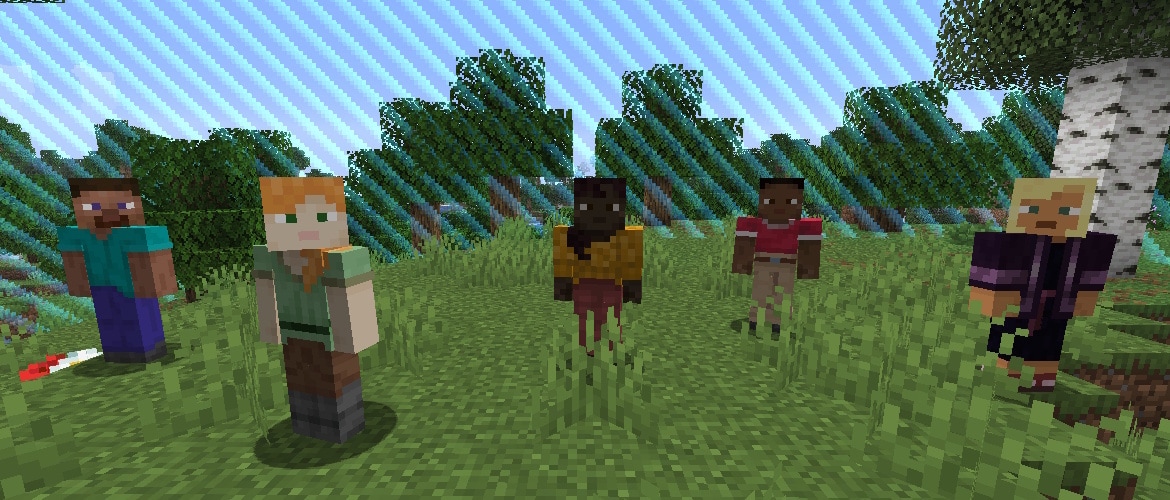
Snapshot 25w36a is out and it includes mannequins, a new technical entity that is spawned with commands and can be used as an NPC. Conflicting key binds will now function together allowing you to bind a key to multiple actions. And as always, this snapshot also includes technical tweaks and bug fixes.
快照 25w36a 已经发布,它包括玩家模型,这是一种新的技术性实体,通过命令生成,可以用作 NPC。冲突的按键绑定现在将一起运行,允许您将一个按键绑定到多个动作。与往常一样,此快照还包括技术性调整和错误修复。
Developer's Note: This snapshot brings a large change to how we collect and draw block entities and particles. We don't anticipate any change of behaviors so please keep an eye out and report anything suspicious as a bug, thank you!
开发者注: 此快照在收集和绘制方块实体和粒子的方式产生了巨大变化。我们预计不会有任何行为变化,因此请密切关注并报告任何可疑的错误,谢谢!
Update: We have now released Snapshot 25w36b to fix some common crashes.
更新: 我们现在发布了快照 25w36b 来修复一些常见的崩溃。
FIXED BUGS IN 25W36B
25W36B 修复的漏洞
NEW FEATURES
新特性
- World Borders can now be set per dimension
- 现在可以为每个维度单独设置世界边界
END LIGHT FLASHES
末地闪光
- While the Ender Dragon fog effect is active the flash source in the sky is not visible and the brightness of the light affecting the world is reduced
- 当末影龙迷雾效果处于激活状态时,天空中的闪光源将不可见,影响世界的光的亮度也会降低
ACCESSIBILITY
辅助功能
- Multiple key binds that have the same key assigned to them can now work together, while before only one would work
- 分配了相同按键的多个按键绑定现在可以同时生效,而以前只有一个可以生效
- For example, you can now bind D to Jump and Strafe Left to jump and strafe left at the same time
- 例如,您现在可以将 D 绑定到 跳跃 和 向左移动 以同时跳跃和向左移动
- The red warning for assigning the same key to multiple key binds is changed to yellow
- 将同一按键分配给多个按键绑定的红色警告更改为黄色
- The spectator hotbar menu key can now be rebound
- 旁观模式快捷栏菜单键现在可以被重新绑定
- It is part of a new Spectator category in the Key Binds screen, alongside the pre-existing Highlight Players key bind
- 它是绑定按键界面新的类别 Spectator 的一部分,和先前存在的 高亮玩家(旁观者) 按键绑定在一起
CHANGES
改动
- Formatting codes are now stripped from Code of Conduct files
- 格式化代码现在已从行为准则文件中删除
WORLD BORDER
世界边界
- The World Border is now dimension-specific
- 世界边界现在是每个维度独立的
- This means that each dimension can have its own World Border size, position, etc.
- 这意味着每个维度都可以有自己的世界边界大小、位置等
MINOR TWEAKS TO BLOCKS, ITEMS AND ENTITIES
对方块、物品和实体的细微调整
- Copper Torch and Copper Lantern colors are adjusted to make them more discernible to color blind players
- 对铜火炬和铜灯笼的颜色进行了调整,使色盲玩家更容易辨别
UI
用户界面
- Double-clicking a word in edit box now selects it
- 现在双击编辑框中的单词会选择它
BLOCK STATES
方块状态
- Powered Shelves can now only connect to other Powered Shelves facing the exact same direction
- 被激活的置物架现在只能连接到面向完全相同方向的其他的被激活的置物架
PERFORMANCE IMPROVEMENTS
性能提升
- Particles outside of players view are not rendered anymore, which provides a performance improvement in some cases
- 不再渲染玩家视野之外的粒子,这在某些情况下提供了性能提升
TECHNICAL CHANGES
技术性改动
- The Data Pack version is now 86.0
- 数据包版本现在是 86.0
DATA PACK VERSION 86.0
数据包版本 86.0
- Added Mannequin entities
- 添加了玩家模型实体
- The World Border is now dimension-specific
- 世界边界现在是每个维度独立的
MANNEQUINS
玩家模型
Added a new type of technical entity called minecraft:mannequin which can only be spawned with summon commands.
添加了一种名为 minecraft:mannequin 的新型技术性实体,它只能通过召唤命令生成
- A Mannequin is a Player Avatar without a connected Player
- 玩家模型是没有连接玩家的玩家头像
- Mannequins always show an "NPC" text where a Player's below_score score would show
- 玩家模型总是会在玩家显示 below_score 分数的位置显示“NPC”文本
- Mannequins function as Living Entities - they can hold and wear equipment, have attributes & effects, take damage, etc
- 玩家模型作用类似于活着的实体——它们可以持有和佩戴装备,具有属性和效果,受到伤害等
Data Fields:
数据字段:
|


 El_T***
铁粒 +80
苦力怕论坛感谢有你~
El_T***
铁粒 +80
苦力怕论坛感谢有你~
 提升卡
提升卡 观察者
观察者
